Introduction
Creating high-quality visuals used to require design skills, expensive software, and a lot of time. Today, creators can turn a simple idea into a polished image in minutes using artificial intelligence. This is why Leonardo AI has become a popular choice for designers, marketers, content creators, and businesses that need fast visual production.
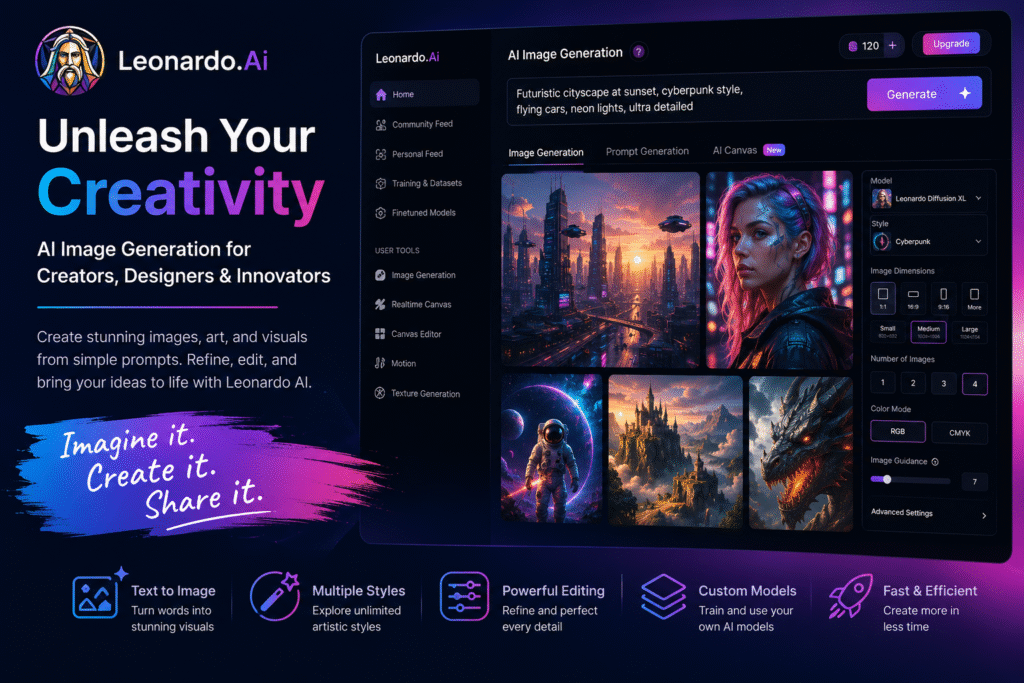
Leonardo AI is a creative platform for generating images, artwork, visual assets, and videos using AI. Its official website says users can generate high-quality visuals from simple prompts or custom models, making it useful across different concepts, styles, and creative use cases.
The biggest benefit of Leonardo AI is speed. Instead of starting from a blank canvas, users can describe what they want and generate visual ideas quickly. It can support blog featured images, social media graphics, ad creatives, product concepts, game assets, character designs, and brand visuals.
In this guide, we will explore how Leonardo AI works, who should use it, its best features, and how it helps as an AI image generation tool, AI art generator, text to image AI, AI design tool, AI image editor, and creative AI tool.
How Leonardo AI Works
Leonardo AI allows users to create images by entering text prompts or using visual inputs. This makes it useful for both beginners and experienced creators. A beginner can type a simple prompt, while a designer can use more detailed instructions to control the style, mood, lighting, composition, and output quality.
For example, a marketer can enter a prompt like:
“Modern SaaS dashboard illustration with blue gradient background, clean UI cards, AI assistant panel, and professional blog featured image style.”
The tool can then generate multiple visual options based on that idea. This is why a text to image AI platform is valuable for content teams. It helps people test creative directions before spending time on final design.
Leonardo’s AI image generator page says it can create images from text or visuals and helps users generate, refine, and scale quality images for projects. This makes it more than a simple image generator. It can support the full creative process from idea to final output.
Key Features of Leonardo AI
AI image generation
The main feature of Leonardo AI is image generation. Users can create visuals for different purposes such as blog images, website graphics, social media posts, concept art, product mockups, advertising ideas, and digital artwork.
As an AI image generation tool, it helps reduce the time needed to create new visuals. Instead of searching stock image websites or waiting for a designer to create a first draft, users can generate multiple concepts quickly.
This is especially useful for:
- Blog featured images
- Social media creatives
- YouTube thumbnails
- Website hero images
- Product concept visuals
- Game environment designs
- Character art
- Marketing campaign ideas
AI art generator for creative styles
Leonardo AI also works well as an AI art generator because it supports different visual styles. Users can create realistic images, illustrations, cinematic scenes, fantasy art, product-style renders, and concept designs.
For example, a game designer can generate a fantasy character. A blogger can create a tech-style featured image. A marketer can create a clean product illustration for an ad campaign.
The value is flexibility. A strong creative AI tool should not limit users to one style. It should help them explore different visual directions until they find the right look.
Image refinement and editing
Good visuals often need adjustments. Leonardo AI helps users refine images instead of only generating one-time outputs. This is useful when the first result is close but not perfect.
As an AI image editor, it can support creative improvements such as changing parts of an image, adjusting composition, improving quality, or exploring new variations. This helps creators move from rough concept to polished final design faster.
For example, a content creator may generate a blog image but want to change the background, improve the lighting, or make the subject clearer. Editing tools make this workflow easier than starting again from zero.
AI video and motion support
Leonardo AI is not limited to static images. Its official video generator page says users can generate motion from text or images, animate stills, and build short sequences with creative control.
This is useful for creators who want to turn visual ideas into short video clips. A brand can animate product concepts. A social media creator can create short visual content. A designer can test motion ideas before producing a full campaign asset.
Who Should Use Leonardo AI?
Leonardo AI is useful for anyone who needs visual content regularly.
| User Type | How Leonardo AI Helps |
|---|---|
| Bloggers | Create featured images and article visuals |
| Marketers | Generate ad creatives and campaign concepts |
| Designers | Explore visual ideas and style directions |
| Social media teams | Create post images and thumbnails |
| Game creators | Build characters, objects, and environments |
| Small businesses | Produce affordable brand visuals faster |
As an AI design tool, it is especially useful for people who need creative output but do not always have access to a full design team. It can help small teams move faster while still producing professional-looking visuals.
For more similar platforms, you can check our internal guide on AI image generation tool.
Best Ways to Use Leonardo AI
To get better results, write clear prompts. A weak prompt gives random results, while a detailed prompt gives the AI stronger direction.
Instead of writing:
“Create a business image.”
Write:
“Create a clean modern business dashboard illustration for a blog featured image, with blue and purple gradient lighting, AI analytics cards, financial chart elements, and professional SaaS design style.”
This gives Leonardo AI more useful information.
Here are a few practical tips:
- Mention the image purpose, such as blog featured image or social media post.
- Add style details, such as realistic, 3D, flat illustration, or cinematic.
- Include color direction when needed.
- Mention layout, such as centered subject or wide banner.
- Add mood, such as professional, futuristic, friendly, or premium.
- Generate multiple versions before choosing the final one.
- Use editing tools to refine the best result.
This workflow helps users get more consistent results from a creative AI tool.
Pros and Limitations
Leonardo AI has strong advantages, but users should understand its limits.
Pros:
- Creates images quickly from prompts
- Supports many creative styles
- Useful for blogs, ads, social media, and design projects
- Helps refine and scale visual ideas
- Can support image and video workflows
- Good for creators, marketers, and small teams
Limitations:
- Some results may need editing
- Prompt quality affects output quality
- Advanced features may require paid plans
- Brand consistency still needs human review
- AI-generated images should be checked before publishing
The best approach is to use Leonardo AI as a creative assistant. Let it speed up idea generation, but review every final image for accuracy, quality, and brand fit.
FAQ
What is Leonardo AI?
Leonardo AI is an AI-powered creative platform that helps users generate images, artwork, visual assets, and videos from prompts or visual inputs.
Is Leonardo AI an AI image generation tool?
Yes. It works as an AI image generation tool because it helps users create visuals from text prompts or image-based inputs.
Can Leonardo AI create artwork?
Yes. It can be used as an AI art generator for illustrations, concept art, characters, environments, and creative visual styles.
Is Leonardo AI good for blog featured images?
Yes. Bloggers and content creators can use it to create blog featured images, article graphics, and visual concepts for different topics.
Can Leonardo AI edit images?
Yes. It can support image refinement and editing workflows, making it useful as an AI image editor for improving generated visuals.
Who should use Leonardo AI?
Designers, marketers, bloggers, creators, game developers, social media teams, and small businesses can use it to produce visual content faster.
Final Thoughts
Leonardo AI is a strong choice for anyone who wants to create high-quality visuals faster. It helps users move from idea to image without needing advanced design skills or long production timelines.
As an AI image generation tool, it supports fast visual creation. As an AI art generator, it helps explore different creative styles. As a text to image AI platform, it turns simple prompts into useful concepts. As an AI design tool and AI image editor, it helps creators refine ideas into publish-ready visuals.
If you regularly create blog images, social media graphics, campaign visuals, or design concepts, Leonardo AI is worth testing. Start with one clear prompt, generate a few variations, refine the best result, and use it to speed up your creative workflow.


