Introduction
AI tools are no longer only used for writing text or generating images. Businesses now want tools that can take action, manage repetitive work, and connect different apps together. This is where Lindy AI becomes useful.
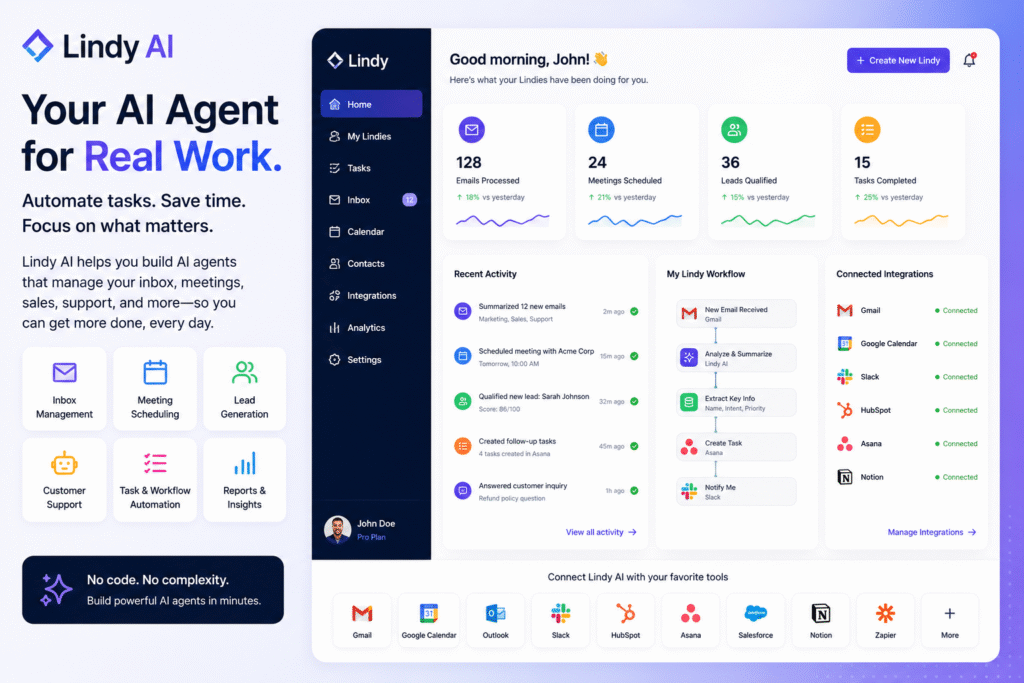
Lindy AI is an AI executive assistant designed to help users manage inboxes, meetings, calendars, and business workflows. The official Lindy website says the platform can save users time by proactively managing inbox, meetings, and calendar work.
The main benefit is simple. Instead of doing every small admin task manually, users can create AI agents that handle repeatable processes. This makes it useful as an AI agents tool, AI executive assistant, AI workflow automation platform, no-code AI agent builder, AI email assistant, and business automation AI solution.
In this guide, we will explore how Lindy AI works, who should use it, its key features, practical use cases, pros, limitations, and best ways to use it for smarter productivity.
How Lindy AI Works
Lindy AI helps users create AI agents that can complete tasks across different tools. These agents are often called Lindies. Instead of only answering questions like a chatbot, they can be set up to support real workflows.
For example, a business owner may want an agent to check email, summarize important messages, create follow-up tasks, and schedule meetings. A sales team may want an agent to qualify leads, send personalized outreach, and update records. A support team may want an agent to answer common customer questions and escalate complex issues.
This is the difference between a normal AI chatbot and an AI agents tool. A chatbot usually responds to a prompt. An agent can follow a goal, use tools, and complete a workflow.
Lindy’s own automation page says users can connect agents with popular tools, AI models, and other agents to automate work visually with no-code ease. This makes the platform useful for non-technical users who want automation without building custom software.
Key Features of Lindy AI
AI executive assistant
One of the strongest use cases for Lindy AI is personal productivity. It can support calendar work, meeting preparation, inbox organization, and follow-up tasks.
An AI executive assistant is useful because many professionals lose time on small tasks. Reading long email threads, checking calendars, preparing meeting notes, and following up with contacts can take hours every week.
With Lindy AI, users can create agents that help reduce this workload. For example, a founder can use it to summarize unread emails, identify urgent messages, and prepare meeting briefs before calls.
AI email assistant
Email is one of the biggest productivity drains for professionals. A good AI email assistant can help by summarizing messages, drafting replies, identifying priority emails, and creating follow-up reminders.
Lindy AI can be useful for people who receive many emails daily, such as founders, recruiters, consultants, sales teams, and client managers. Instead of manually reading every message from the beginning, users can rely on an agent to highlight what matters first.
However, email automation should be used carefully. Important replies should still be reviewed before sending, especially when dealing with clients, legal matters, finance, or sensitive information.
AI workflow automation
Lindy AI also supports AI workflow automation. This means users can connect different steps into one automated process.
A simple workflow could be:
- A new lead submits a form.
- Lindy checks the lead details.
- The agent enriches the contact information.
- It drafts an outreach email.
- It schedules a follow-up task.
- It updates the CRM or workspace.
This kind of business automation AI workflow can save time for sales, operations, marketing, and customer success teams.
Lindy’s AI agent blog explains that agents can execute tasks such as email replies, lead generation, and answering FAQs. That makes the platform flexible for different business use cases.
No-code AI agent builder
A major advantage of Lindy AI is that it is designed for users who do not want to code. A no-code AI agent builder helps business users create automations visually instead of relying only on developers.
This is helpful for small teams because not every company has an engineering team available to build internal automation. A marketer, founder, or operations manager can create simple agents for repetitive work and test workflows faster.
Who Should Use Lindy AI?
Lindy AI is useful for professionals and teams that handle repetitive digital work.
| User Type | How Lindy AI Helps |
|---|---|
| Founders | Manage inbox, meetings, leads, and follow-ups |
| Sales teams | Automate lead qualification and outreach |
| Recruiters | Screen messages, schedule interviews, and track candidates |
| Consultants | Summarize client emails and prepare meeting notes |
| Customer support teams | Answer common questions and escalate complex cases |
| Operations teams | Automate repetitive admin workflows |
As an AI agents tool, it is best for people who already know which tasks waste their time. The clearer the workflow, the easier it is to automate.
For more similar tools, you can check our internal guide on AI agents tool.
Best Ways to Use Lindy AI
To get better results from Lindy AI, start with one small workflow. Do not try to automate your entire business on the first day.
Start with a simple task such as:
- Summarizing daily emails
- Preparing meeting notes
- Creating follow-up reminders
- Drafting sales outreach
- Organizing calendar events
- Responding to common customer questions
Once the first workflow works well, you can expand to more advanced automations.
A good setup process:
- Choose one repetitive task.
- Write the exact goal.
- Decide which apps the agent needs.
- Add clear instructions.
- Test with sample data.
- Review the results manually.
- Improve the workflow step by step.
This approach helps reduce mistakes and keeps automation under control.
Pros and Limitations
Lindy AI has strong benefits, but it should be used responsibly.
Pros:
- Helps automate repetitive business tasks
- Works as an AI executive assistant
- Supports no-code agent creation
- Useful for inbox, calendar, sales, and support workflows
- Can connect with different business tools
- Saves time for individuals and teams
Limitations:
- AI outputs still need human review
- Poor instructions can create weak results
- Sensitive workflows need extra caution
- Some advanced automations may require setup time
- It should not be trusted blindly for critical decisions
AI agents can be powerful, but they work best with clear rules and human oversight. A Wired article about AI assistants also highlighted that autonomous tools can make mistakes when managing real-world tasks, so careful review is important.
FAQ
What is Lindy AI?
Lindy AI is an AI executive assistant and agent platform that helps users automate business tasks such as inbox management, meetings, scheduling, sales outreach, and workflows.
Is Lindy AI an AI agents tool?
Yes. Lindy AI works as an AI agents tool because users can create agents that follow goals and complete tasks across connected apps.
Can Lindy AI manage emails?
Yes. It can support email workflows by helping summarize messages, draft replies, identify important emails, and create follow-up tasks.
Is Lindy AI good for sales teams?
Yes. Sales teams can use it for lead qualification, outreach, follow-ups, CRM updates, and repetitive sales operations.
Do I need coding skills to use Lindy AI?
No. Lindy AI is designed as a no-code AI agent builder, so business users can create workflows without writing code.
Can Lindy AI replace employees?
No. It should support employees by reducing repetitive work. Human review is still important for decisions, communication, and sensitive tasks.
Final Thoughts
Lindy AI is a strong option for anyone who wants to move beyond basic AI chat and start automating real work. It helps users manage inboxes, meetings, calendars, sales tasks, and business workflows with AI agents.
As an AI executive assistant, it can reduce daily admin work. As an AI workflow automation platform, it can connect tasks across different tools. As a no-code AI agent builder, it gives non-technical users a practical way to create useful automations.
The best way to start is simple. Pick one repetitive task, build one agent, test it carefully, and improve the workflow over time. If your day is filled with emails, meetings, follow-ups, and manual admin work, Lindy AI is worth exploring.


