Introduction
Creating a professional presentation can take hours. You need to plan the structure, write the content, design each slide, choose visuals, adjust spacing, and make everything look clean. For business owners, marketers, students, consultants, and startup teams, this can become a frustrating process, especially when deadlines are tight.
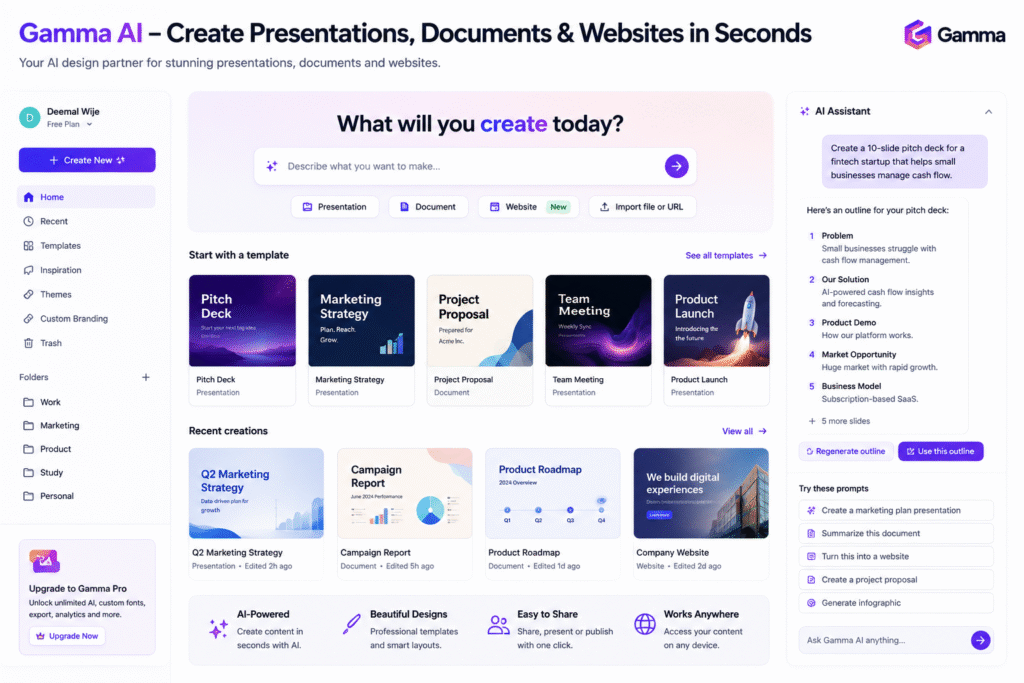
Gamma AI helps solve this problem by turning ideas, prompts, documents, and outlines into polished visual content. Gamma describes itself as an AI-powered design partner that helps users create presentations, websites, documents, and more without needing coding or design experience.
The main value of Gamma AI is speed. Instead of starting from a blank slide, users can describe what they want and let the platform generate a first version. This makes it useful as an AI presentation tool, AI slide deck generator, AI presentation maker, AI design tool, AI website builder, and productivity AI tool.
In this guide, we will explore how Gamma AI works, its key features, who should use it, its benefits, limitations, and how to use it properly for faster content creation.
How Gamma AI Works
Gamma AI is built to help users create visual content from ideas. Instead of manually designing every slide, users can enter a prompt, paste an outline, or upload a document. Gamma then creates a structured deck or document that users can edit and refine.
Gamma’s presentation product page says users can turn any prompt, document, or idea into a complete slide deck. It also explains that users can describe the deck, paste an outline, or upload a Word doc, PDF, or Google Doc so Gamma can start structuring slides from that content.
This is useful for people who already have information but do not want to spend too much time designing. For example, a marketer can paste a campaign outline and generate a presentation. A student can upload research notes and create a class presentation. A founder can create a pitch deck from a startup idea.
As an AI presentation maker, Gamma AI reduces the blank-page problem. It gives users a starting point that can be edited, branded, and improved.
Key Features of Gamma AI
AI presentation creation
The strongest feature of Gamma AI is presentation generation. Users can create decks from simple prompts, detailed outlines, or existing documents. This makes it useful for pitch decks, reports, educational slides, business proposals, and training materials.
Gamma’s AI PowerPoint page says users can create professional PowerPoint-style decks quickly, then refine and customize the result.
As an AI slide deck generator, this can save time for teams that regularly create presentations. Instead of manually formatting each slide, users can focus more on the message and less on layout.
Common use cases include:
- Startup pitch decks
- Marketing strategy presentations
- Client proposal decks
- Monthly performance reports
- Training presentations
- Product launch decks
- Educational content
- Internal business updates
Documents and visual reports
Gamma AI is not only for slides. It can also create structured visual documents such as one-pagers, guides, white papers, and reports. The official Gamma homepage highlights presentations and documents as core content types users can create with the platform.
This is useful because some information does not need a traditional slide deck. A visual document can be better for sharing a strategy, explaining a process, or creating a business summary.
For example, a consultant could create a client report with sections, visuals, cards, and key takeaways. A content creator could turn a blog outline into a visual guide.
Website building
Gamma also works as an AI website builder. Its homepage says users can create websites along with presentations and other content types.
This feature is useful for people who want to quickly create landing pages, simple websites, portfolio pages, event pages, or product concept pages without using a full web design tool.
For example, a startup founder could use Gamma AI to create a quick product landing page before testing an idea. A freelancer could create a simple portfolio page. A marketer could build a campaign page for a launch.
Export and sharing
Gamma supports exporting content. Its homepage says presentations can be exported to PPT, PDF, and more. This is important because many users still need to share files with clients, teachers, managers, or stakeholders.
Exporting makes the tool more practical for real work. Users can create the first draft in Gamma, then share it as a PDF or PowerPoint-style file when needed.
Who Should Use Gamma AI?
Gamma AI is useful for anyone who creates presentations, documents, or visual content regularly.
| User Type | How Gamma AI Helps |
|---|---|
| Marketers | Create campaign decks, reports, and strategy documents |
| Startup founders | Build pitch decks and product launch presentations |
| Students | Create class presentations and study summaries |
| Consultants | Build client proposals and visual reports |
| Sales teams | Create product decks and customer presentations |
| Content creators | Turn ideas into visual guides and web pages |
As an AI design tool, it is especially useful for people who are not professional designers but still need clean, professional-looking content.
For more similar platforms, you can check our internal guide on AI presentation tool.
Best Ways to Use Gamma AI
To get better results from Gamma AI, start with a clear prompt. A vague prompt may create a generic presentation, while a detailed prompt gives better structure and tone.
Instead of writing:
“Create a marketing presentation.”
Write:
“Create a 10-slide presentation for a social media campaign proposal for a motorcycle brand, including campaign objective, target audience, big idea, content pillars, paid media plan, KPIs, and timeline.”
This gives the AI presentation maker more useful direction.
A simple workflow:
- Define the goal of the presentation.
- Prepare a short outline.
- Add target audience details.
- Mention the tone and style.
- Generate the first draft.
- Edit the content manually.
- Replace weak visuals if needed.
- Export or share the final version.
Gamma AI works best when you treat it as a fast first-draft tool. It can build structure and design quickly, but you should still review the message, facts, audience fit, and brand style.
Pros and Limitations
Gamma AI has strong advantages, but it also has limits.
Pros:
- Creates presentations quickly
- Helps reduce manual slide formatting
- Supports documents and websites
- Useful for non-designers
- Can start from prompts or uploaded documents
- Supports export options for sharing
Limitations:
- AI-generated content may need editing
- Some outputs can feel generic without detailed prompts
- Brand consistency may need manual adjustment
- Complex presentations may require extra refinement
- Users should verify facts before presenting
The best approach is to use Gamma AI for speed, structure, and design support, then apply human judgment for accuracy, storytelling, and final polish.
FAQ
What is Gamma AI?
Gamma AI is an AI-powered platform that helps users create presentations, documents, websites, and visual content from prompts, ideas, or uploaded documents.
Is Gamma AI an AI presentation tool?
Yes. Gamma AI works as an AI presentation tool because it helps users generate slide decks quickly from prompts, outlines, or files.
Can Gamma AI create PowerPoint-style decks?
Yes. Gamma’s AI PowerPoint page says it can help create professional PowerPoint-style decks that users can refine and customize.
Can Gamma AI create websites?
Yes. Gamma supports website creation, making it useful as an AI website builder for simple landing pages, portfolios, and product pages.
Who should use Gamma AI?
Marketers, students, founders, consultants, sales teams, educators, and creators can use Gamma AI to create presentations and visual content faster.
Can Gamma AI replace a designer?
No. Gamma AI can speed up content creation, but professional design review is still useful for brand-heavy or high-stakes presentations.
Final Thoughts
Gamma AI is a strong choice for anyone who wants to create presentations, documents, and simple websites faster. It helps users move from idea to visual content without spending hours on formatting and layout.
As an AI presentation tool, it can generate slide decks quickly. As an AI slide deck generator, it helps reduce blank-page stress. As an AI design tool and productivity AI tool, it supports faster content creation for business, education, marketing, and sales.
The best way to use Gamma AI is to start with a clear outline, generate a first draft, edit the content carefully, improve the visuals, and export the final version. If you create presentations often, Gamma AI is worth testing for your next deck.


