Introduction
Managing projects is not only about creating tasks and assigning deadlines. Teams also need to understand priorities, track progress, remove blockers, update stakeholders, and keep everyone aligned. When projects grow across departments, clients, tools, and timelines, manual coordination can quickly become difficult.
Asana AI helps teams manage work more intelligently by adding AI-powered support to project tracking, updates, goals, workflows, and decision-making. Asana describes its AI features as tools that help users understand where to focus, automate routine work, and accelerate decisions.
The main value of Asana is that it works inside a project management platform many teams already use. Instead of copying project data into a separate chatbot, teams can use AI closer to their tasks, projects, portfolios, and goals.
In this guide, we will explore how Asana AI works, its best features, who should use it, practical workflows, pros, limitations, and how it helps as an AI project management tool, AI workflow automation platform, AI task management solution, smart project updates system, team productivity software, and project planning AI assistant.
How Asana AI Works
Asana AI is designed to help teams understand work faster and manage projects with less manual effort. In a normal project workflow, managers often spend time checking task comments, reviewing deadlines, asking for updates, writing reports, and identifying blockers. These tasks are important, but they can take time away from strategy and execution.
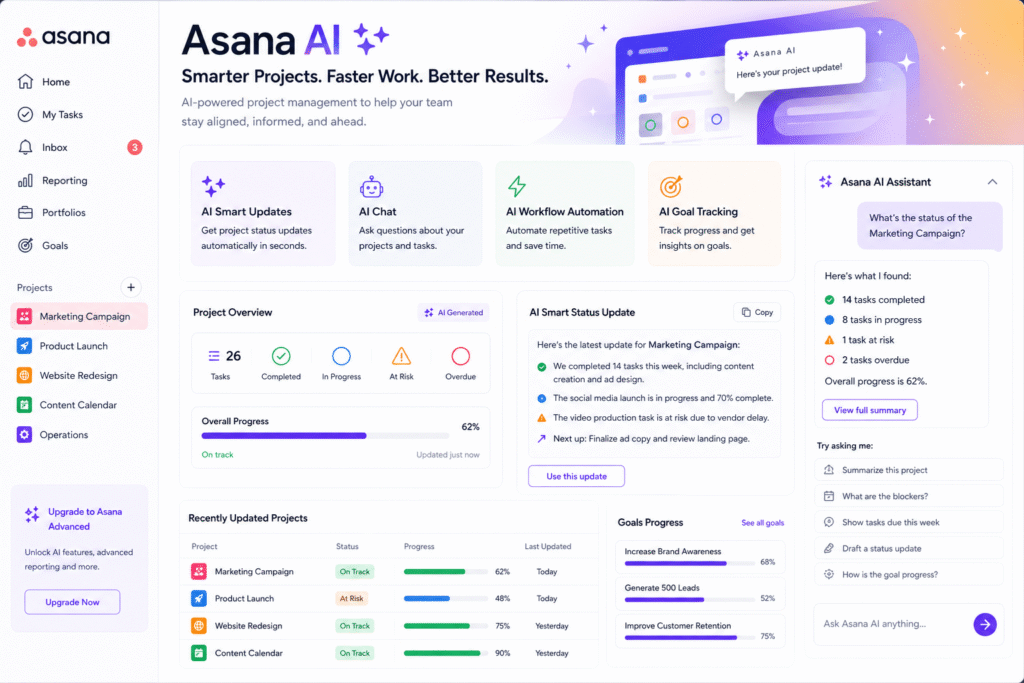
Asana’s help center explains that Asana can provide quick updates on tasks and projects, help users stay informed without digging through every detail, and answer project management questions through smart chat.
This makes Asana AI useful for teams that need faster visibility. For example, a marketing manager can ask for the latest status of a campaign. A product lead can check blockers across a launch project. An operations manager can review goal progress without opening every task manually.
As an AI project management tool, it helps turn scattered project data into clearer insights.
Key Features of Asana AI
Smart status updates
One of the most useful features of Asana is smart status. Project managers often need to write weekly updates for projects, portfolios, or company goals. This can take time, especially when work is spread across many tasks.
Asana’s smart status feature can draft status updates by analyzing project, portfolio, or goal information. This helps managers create smart project updates faster while still allowing them to review and edit the final message.
For example, a project lead can use smart status to summarize:
- Completed work
- Current blockers
- Delayed tasks
- Upcoming deadlines
- Next steps
- Risks that need attention
This is useful because stakeholders do not always need every detail. They need a clear update that shows what changed and what needs action.
AI workflow automation
Asana AI also supports workflow automation. Asana’s workflow automation page describes a future of work where humans and AI agents can run workflows together from a shared plan, with tasks assigned to both team members and AI agents such as a launch planner or status reporter.
This makes the platform useful for repetitive project workflows. For example, a team could automate parts of a campaign launch, onboarding process, content approval flow, or product release checklist.
As an AI workflow automation tool, Asana AI can help reduce manual steps and make recurring processes more consistent.
AI task management
AI task management is helpful when teams have many tasks and need better clarity. Asana AI can help users understand project information, summarize work, and identify what needs focus.
For example, instead of reading a long task thread, a manager can get a quick summary. Instead of asking several people for updates, the manager can review progress inside the project workspace.
This does not remove the need for human communication, but it reduces the time spent searching for basic information.
Smart goals and project planning
Goal tracking is another important part of project management. Asana’s help center says smart goals can standardize and improve goal-setting, while Asana AI can support project questions and productivity inside daily workflows.
This is useful for teams that connect daily work to larger business outcomes. A project planning AI assistant becomes more valuable when it helps teams understand not only what tasks are due, but also how those tasks support bigger goals.
Who Should Use Asana AI?
Asana AI is useful for teams that manage multiple projects, stakeholders, and deadlines.
| User Type | How Asana AI Helps |
|---|---|
| Project managers | Create updates, track blockers, and summarize progress |
| Marketing teams | Manage campaigns, approvals, content calendars, and reports |
| Product teams | Track launches, roadmap tasks, and cross-team dependencies |
| Operations teams | Standardize recurring workflows and internal processes |
| Agencies | Manage client projects, updates, and deliverables |
| Leadership teams | Monitor goals, portfolios, and progress across teams |
As team productivity software, Asana AI is especially helpful when teams already use Asana for task and project tracking.
For more similar tools, you can check our internal guide on AI tool.
Best Ways to Use Asana AI
To get better results from Asana AI, teams should keep their project spaces clean. AI works best when tasks, owners, due dates, sections, statuses, and descriptions are properly maintained.
Start with clear task names. Instead of writing “Website work,” write “Update homepage hero section copy.” Instead of “Client report,” write “Prepare July social media performance report.”
A simple workflow:
- Create a project with clear sections.
- Add tasks with owners and due dates.
- Use descriptions and comments for important context.
- Keep task statuses updated.
- Use smart status to draft project updates.
- Ask smart chat project-related questions.
- Review AI-generated outputs before sharing.
- Improve workflow automation over time.
This helps teams use AI without losing control. Asana AI should support planning, reporting, and decision-making, but project owners should still review important updates.
Pros and Limitations
Asana AI has strong benefits, but users should understand its limits.
Pros:
- Helps create faster project updates
- Supports task and project summaries
- Can reduce manual reporting work
- Works inside an existing project management platform
- Supports workflow automation and goal tracking
- Useful for managers, teams, agencies, and operations
Limitations:
- AI outputs still need human review
- Results depend on clean project data
- Poor task descriptions can reduce usefulness
- Some AI or automation features may depend on plan availability
- It should not replace project manager judgment
A 2026 research paper on agentic software project management notes that AI can support project managers, but humans should remain central for accountability, judgment, trust, and strategic leadership.
FAQ
What is Asana AI?
Asana AI is a set of AI-powered features inside Asana that helps teams summarize work, create project updates, answer work-related questions, automate workflows, and improve project visibility.
Is Asana AI an AI project management tool?
Yes. Asana AI works as an AI project management tool because it supports project updates, workflow automation, task summaries, goal tracking, and team alignment.
Can Asana AI create project status updates?
Yes. Asana smart status can draft status updates for projects, portfolios, and goals by analyzing project information.
Can Asana AI help with workflow automation?
Yes. Asana includes workflow and automation features that can help teams standardize recurring processes and reduce manual project work.
Who should use Asana AI?
Project managers, marketers, product teams, agencies, operations teams, and leadership teams can use Asana AI to manage work more clearly and efficiently.
Can Asana AI replace a project manager?
No. Asana can support project managers, but human judgment is still needed for prioritization, communication, conflict resolution, risk management, and final decisions.
Final Thoughts
Asana AI is a strong choice for teams that want project management to become faster, clearer, and less manual. It helps users summarize work, draft smart updates, automate workflows, answer project questions, and connect daily tasks with larger goals.
As an AI project management tool, it supports better visibility. As an AI task management solution, it helps teams understand work faster. As project planning AI and team productivity software, it helps reduce repetitive reporting and coordination.
The best way to use Asana is to keep project data clean, use clear task names, review AI-generated updates carefully, and combine automation with human leadership. If your team already uses Asana, this tool is worth testing for smarter project tracking and faster reporting.


