Introduction
Most businesses use too many apps. Emails come through Gmail, leads arrive from forms, tasks are tracked in project tools, customer data sits in a CRM, and team updates happen in Slack. When these tools do not work together smoothly, people waste time copying data, checking updates, sending reminders, and repeating the same admin tasks every day.
Zapier AI Agents help solve this problem by combining AI with automation. Instead of only creating simple “when this happens, do that” workflows, users can build AI-powered agents that understand instructions, work across apps, and help complete business tasks. Zapier says its Agents product lets users create AI agents that automate tasks using the power of Zapier’s thousands of apps.
The main value of Zapier AI Agents is practical automation. A small team can use it to process leads, summarize messages, update databases, draft replies, create tasks, and connect workflows without building custom software. This makes it useful as an AI agents tool, AI workflow automation platform, no-code automation tool, AI task automation solution, business automation AI system, and AI productivity tool.
In this guide, we will explore how Zapier AI Agents work, who should use them, key features, real-world use cases, limitations, and best practices for safer automation.
How Zapier AI Agents Work
Zapier AI Agents are designed to help users automate work across connected apps. Traditional automation is usually rule-based. For example, when a new form submission arrives, send the data to a spreadsheet. That is useful, but many business tasks need more flexibility.
An AI agent can read information, understand context, make decisions based on instructions, and then trigger actions across different apps. Zapier’s help center also explains that AI by Zapier can summarize, classify, draft, make decisions, and help build AI agents that work across apps autonomously.
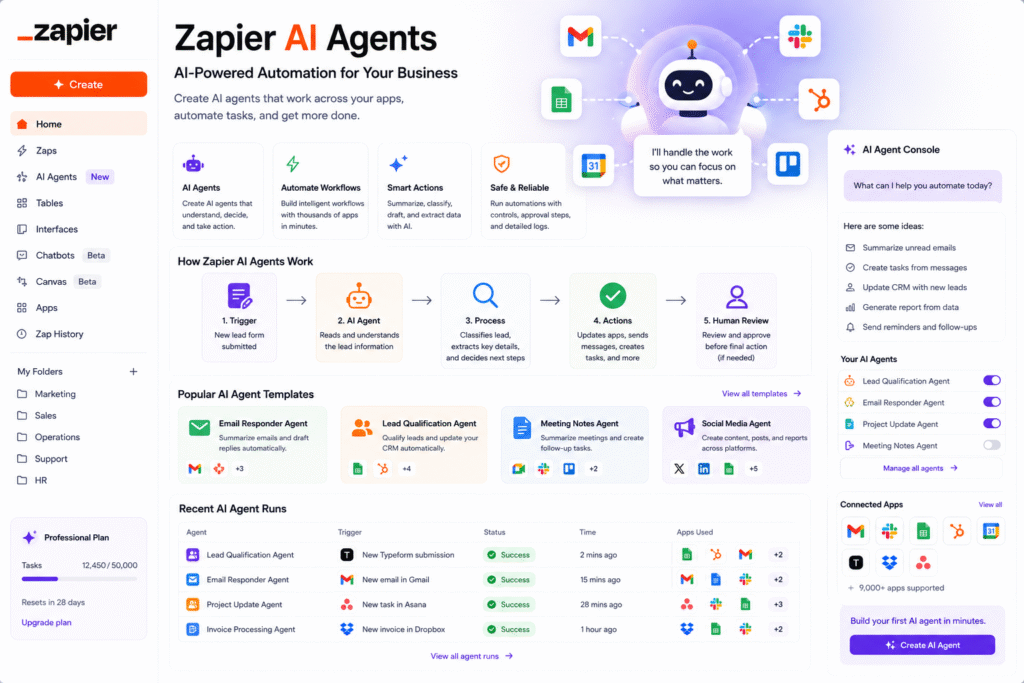
For example, imagine a new lead enters through a website form. A normal automation might only save the lead in Google Sheets. A smarter AI workflow can check the lead message, identify the customer’s intent, classify the lead quality, draft a reply, create a CRM record, and notify the sales team in Slack.
This is why Zapier AI Agents are useful for teams that want automation to handle more than basic data movement.
Key Features of Zapier AI Agents
AI agents for real business tasks
The biggest strength of Zapier AI Agents is that they are built around real work. Zapier’s Agents page describes AI teammates that can handle workflows such as content creation, Slack thread summaries, lead-related tasks, and app-based actions.
This makes the platform useful for daily operations. Users can build agents for tasks like:
- Summarizing emails
- Processing form submissions
- Updating CRM records
- Creating tasks from messages
- Drafting follow-up emails
- Organizing spreadsheet data
- Sending Slack updates
- Monitoring customer requests
As an AI agents tool, Zapier is especially useful because it connects with many business apps. That app coverage helps agents move work between tools instead of staying inside one isolated platform.
AI workflow automation
Zapier is already known for workflow automation. With AI added, the platform becomes more flexible for tasks that involve language, decisions, summaries, and classification.
For example, a support team can use AI workflow automation to classify incoming support emails by urgency. A marketing team can summarize social media comments and send insights to a Google Doc. A sales team can qualify leads and create follow-up tasks automatically.
Zapier’s migration documentation also notes that AI reasoning, tool calling, and autonomous task execution can run inside AI by Zapier steps in the Zap editor. This shows how agent-style AI work can be connected with broader automation workflows.
No-code automation
A major benefit of Zapier AI Agents is that users do not need to be developers to build useful automations. Zapier is designed around no-code workflows, and its AI tools help business users create more advanced processes with natural instructions.
A no-code automation tool is helpful for small businesses, agencies, freelancers, marketers, and operations teams because they often need automation but do not always have engineering support.
For example, an agency could build an agent that receives a client request, summarizes it, creates a task in Asana, adds a deadline, and notifies the account manager.
App integrations
Zapier’s pricing page highlights automation across 9,000+ apps, which is one of the biggest reasons people use the platform. For AI task automation, this matters because business work rarely happens in one tool.
A useful agent may need to connect with email, calendar, spreadsheets, CRM, chat apps, forms, and project management tools. Zapier’s large app ecosystem makes it easier to create workflows across different departments.
Who Should Use Zapier AI Agents?
Zapier AI Agents are useful for people and teams that repeat the same digital tasks often.
| User Type | How Zapier AI Agents Help |
|---|---|
| Small businesses | Automate emails, leads, forms, and admin work |
| Marketing teams | Summarize campaign data, create tasks, and organize content workflows |
| Sales teams | Qualify leads, draft follow-ups, and update CRM records |
| Support teams | Classify customer requests and send internal alerts |
| Agencies | Manage client requests, reports, and project handoffs |
| Operations teams | Connect apps and reduce repetitive manual work |
As an AI productivity tool, it is best for users who already know which repeated tasks waste time. The clearer the process, the easier it is to automate.
For more similar platforms, you can check our internal guide on AI agents tool.
Best Ways to Use Zapier AI Agents
To get better results from Zapier AI Agents, start small. Do not automate your entire business on the first day. Pick one repetitive task that is easy to test.
A simple starting workflow could be:
- A new website lead submits a form.
- The agent reads the message.
- It classifies the lead as high, medium, or low priority.
- It adds the lead to a CRM or spreadsheet.
- It drafts a follow-up email.
- It alerts the sales team in Slack.
- A human reviews the reply before sending.
This kind of AI workflow automation saves time while keeping human control in important steps.
Here are a few practical tips:
- Start with one clear task.
- Write detailed instructions for the agent.
- Test with sample data before using it live.
- Add approval steps for emails or sensitive actions.
- Review logs and outputs regularly.
- Avoid giving agents too much control too early.
- Use human review for sales, finance, legal, and customer-facing communication.
AI automation is powerful, but it should be managed carefully. A 2026 research paper on authenticated agentic workflows notes that enterprise AI agents need strong controls because real workflows can involve multiple systems, sensitive data, and policy requirements.
Pros and Limitations
Zapier AI Agents offer strong benefits, but users should understand the limits.
Pros:
- Connects AI with many business apps
- Helps automate repetitive tasks
- Useful for sales, marketing, support, and operations
- Works well for no-code users
- Can summarize, classify, draft, and trigger actions
- Helps small teams move faster
Limitations:
- Workflows need testing before live use
- AI outputs can still make mistakes
- Sensitive actions need approval steps
- Complex workflows may need careful setup
- Pricing may depend on automation volume and features
- Human review is still important for critical decisions
The best approach is to use Zapier AI Agents as a business automation assistant, not as a fully independent decision-maker.
FAQ
What are Zapier AI Agents?
Zapier AI Agents are AI-powered automation tools that help users automate tasks across connected business apps using Zapier’s automation platform.
Is Zapier AI Agents an AI agents tool?
Yes. It works as an AI agents tool because users can create AI agents that follow instructions, process information, and complete tasks across apps.
Can Zapier AI Agents automate emails?
Yes. Zapier AI workflows can help summarize emails, classify messages, draft replies, create tasks, and trigger follow-up steps across connected apps.
Is Zapier good for no-code automation?
Yes. Zapier is widely used as a no-code automation tool because it lets users build workflows between apps without writing custom code.
Who should use Zapier AI Agents?
Small businesses, marketers, sales teams, support teams, agencies, freelancers, and operations teams can use Zapier AI Agents to reduce repetitive digital work.
Can Zapier AI Agents replace employees?
No. They should support employees by handling repetitive tasks. Human review is still important for decisions, customer communication, sensitive data, and final approvals.
Final Thoughts
Zapier AI Agents are a strong choice for teams that want to automate real business work across multiple apps. They help users summarize information, classify requests, draft responses, update systems, and trigger workflows without building custom software.
As an AI agents tool, Zapier AI Agents help businesses move beyond simple automation. As an AI workflow automation platform, they connect tasks across email, CRM, spreadsheets, forms, chat, and project tools. As a business automation AI solution, they can save time and reduce manual admin work.
The best way to start is simple. Choose one repeated task, build one agent, test the workflow carefully, and add human approval where needed. If your team spends too much time moving data between apps, Zapier AI Agents are worth exploring.


