Introduction
Typing can slow down your ideas. You may know exactly what you want to say, but writing an email, blog outline, ChatGPT prompt, client reply, or meeting note still takes time. This becomes even harder when you are working across many apps and need to produce clear writing quickly.
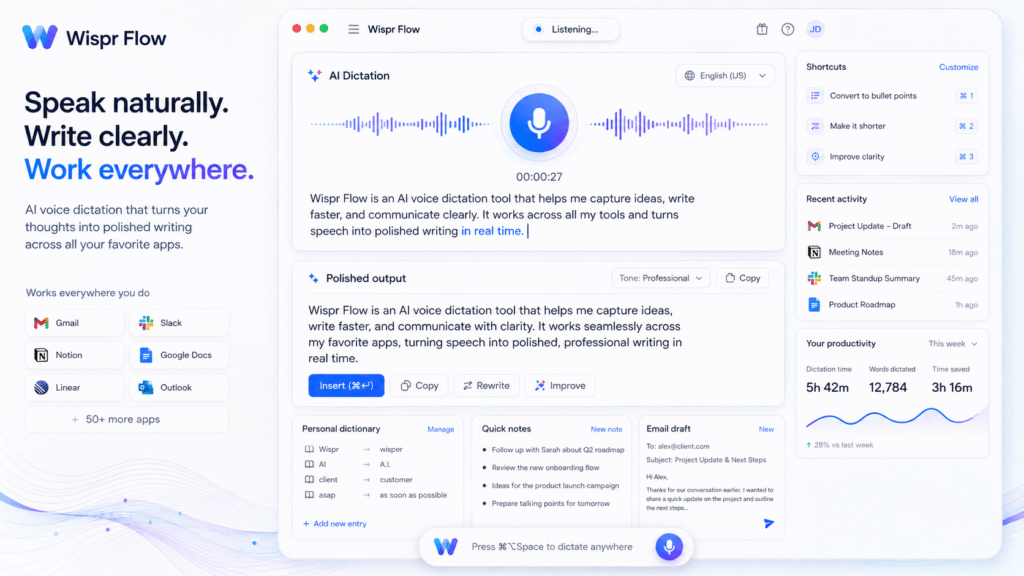
Wispr Flow helps solve this problem by turning spoken words into clean, polished text. The official Wispr Flow site describes it as a voice-to-text AI that turns speech into clear writing across apps, with a personal dictionary, style, and settings synced across devices.
The main value of Wispr Flow is speed and convenience. Instead of typing everything manually, users can speak naturally and let AI clean up the output. This makes it useful as an AI voice dictation tool, voice to text AI, AI writing assistant, speech to text app, AI transcription tool, and productivity dictation tool.
How Wispr Flow Works
Wispr Flow works inside text fields on your computer or phone. Its official documentation says Flow is a voice dictation app that works in any text field on a computer or phone.
This means users can dictate inside tools like email apps, documents, chat apps, AI tools, project management platforms, and browser text boxes. Instead of opening a separate transcription tool, the idea is to speak where you already work.
For example, a content writer can dictate a blog intro. A marketer can speak a campaign caption. A project manager can dictate task updates. A developer can draft technical notes. A student can record rough study notes and convert them into cleaner text.
As an AI writing assistant, Wispr Flow is useful because it does not only capture speech. It also helps polish messy spoken language into readable writing.
Key Features of Wispr Flow
AI voice dictation across apps
The strongest feature of Wispr Flow is cross-app dictation. The product site says it is designed for voice dictation in every application and can turn speech into polished writing.
This is useful because many users do not want to copy and paste text between tools. They want to speak directly where the text needs to appear.
An AI voice dictation tool can help with:
- Emails
- Blog outlines
- Social media captions
- Client replies
- AI prompts
- Notes
- Messages
- Reports
- Task updates
For people who write many short messages every day, this can reduce typing fatigue and speed up communication.
AI edits built in
Wispr Flow’s features page says the tool offers voice dictation with AI edits built in and claims dictation can be much faster than typing.
This matters because raw speech is often messy. When people talk, they pause, repeat words, change direction, and use informal phrasing. A normal transcription tool may capture all of that directly. Wispr Flow aims to turn speech into cleaner text, making the output more useful.
For example, you might say a rough sentence like, “Tell him I checked the report and maybe we should update the intro section before sending.” A voice to text AI tool can help convert that into a cleaner message like, “I reviewed the report and suggest updating the introduction section before sending it.”
Personal dictionary and style
Wispr Flow also highlights personal dictionary and synced style settings across devices. This is helpful for users who often mention names, tools, brands, technical terms, or industry-specific words.
For example, if you frequently write about SEO tools, client names, product names, or local business names, a personal dictionary can help reduce spelling mistakes. This makes Wispr useful as a productivity dictation tool for marketers, bloggers, consultants, and business users.
Android support and accessibility
Wispr is also available for Android. Its Google Play listing describes it as a voice-to-text accessibility tool that turns rambling speech into formatted text and says it uses Android Accessibility Service to provide universal voice dictation across apps.
This is useful for mobile users who want to dictate messages, notes, prompts, or replies without depending only on the default keyboard voice typing.
Who Should Use Wispr Flow?
| User Type | How Wispr Flow Helps |
|---|---|
| Bloggers | Dictate outlines, introductions, drafts, and content ideas |
| Marketers | Create captions, campaign notes, emails, and client replies faster |
| Students | Capture study notes and convert rough speech into readable text |
| Founders | Reply to messages, write updates, and capture ideas quickly |
| Freelancers | Draft proposals, task updates, and client communication |
| Busy professionals | Reduce typing time across apps and devices |
For more similar platforms, you can check the internal guide on AI tool
Best Ways to Use Wispr Flow
To get better results from Wispr, speak clearly and structure your thoughts before dictating. AI can clean up your words, but it still needs a clear idea to work with.
A simple workflow:
- Decide what you want to write.
- Speak in short, clear sentences.
- Let Wispr Flow convert speech into text.
- Review the output before sending.
- Edit names, numbers, or sensitive details manually.
- Save repeated terms in your personal dictionary.
- Use it for low-risk writing first.
- Expand into emails, documents, and content drafts later.
For example, if you are writing a blog about AI tools, you can speak your rough ideas first. Then you can edit the generated text into a proper blog structure. This helps you move faster from idea to first draft.
Pros and Limitations
Wispr has strong benefits, but it is not perfect for every user.
Pros:
- Helps users write faster with voice
- Works across many text fields
- Useful for emails, prompts, notes, and content drafts
- AI edits can clean up rough speech
- Personal dictionary helps with names and terms
- Good for mobile and desktop productivity
Limitations:
- Voice input still needs review before sending
- Accuracy may depend on accent, noise, microphone quality, and speech clarity
- Some users may prefer built-in dictation tools
- Sensitive information should be dictated carefully
- AI edits can sometimes change tone or meaning
- Strong results need clear speaking habits
A Wired article about transcription tools notes that built-in dictation options from Apple and Google are already useful for many people, so paid AI dictation tools should be judged by whether they add enough workflow value beyond basic voice typing.
FAQ
What is Wispr Flow?
Wispr is an AI voice dictation tool that turns spoken words into polished text across apps and devices.
Is Wispr Flow a voice to text AI tool?
Yes. Wispr works as a voice to text AI tool because it converts speech into written text and adds AI editing support.
Can Wispr Flow work inside different apps?
Yes. Wispr documentation says it works in any text field on a computer or phone.
Is Wispr Flow useful for content creators?
Yes. Content creators can use Wispr to dictate blog ideas, captions, outlines, video scripts, and AI prompts faster.
Does Wispr Flow support Android?
Yes. Wispr has an Android app, and its Play Store listing says it provides universal voice dictation across apps using Android Accessibility Service.
Can Wispr Flow replace typing completely?
Not fully. It can reduce typing, but users should still review important messages, names, numbers, and final wording before sending or publishing.
Final Thoughts
Wispr Flow is a smart tool for people who think faster than they type. It helps users speak naturally and turn rough ideas into cleaner written text across different apps.
As an AI voice dictation tool, it saves time. As a voice to text AI platform, it helps turn speech into usable writing. As an AI writing assistant, it supports emails, notes, prompts, captions, and content drafts.
If your daily work includes a lot of typing, Wispr is worth testing. Start with simple notes and short replies, review the output carefully, and slowly add it into your writing workflow where it saves the most time.


