Introduction
Online meetings are now part of daily work, but they are not always smooth. Background noise, echo, unclear speech, missed action items, and long follow-up notes can make meetings feel stressful. Whether you are joining a client call, team meeting, interview, webinar, or sales discussion, poor audio and weak documentation can reduce productivity.
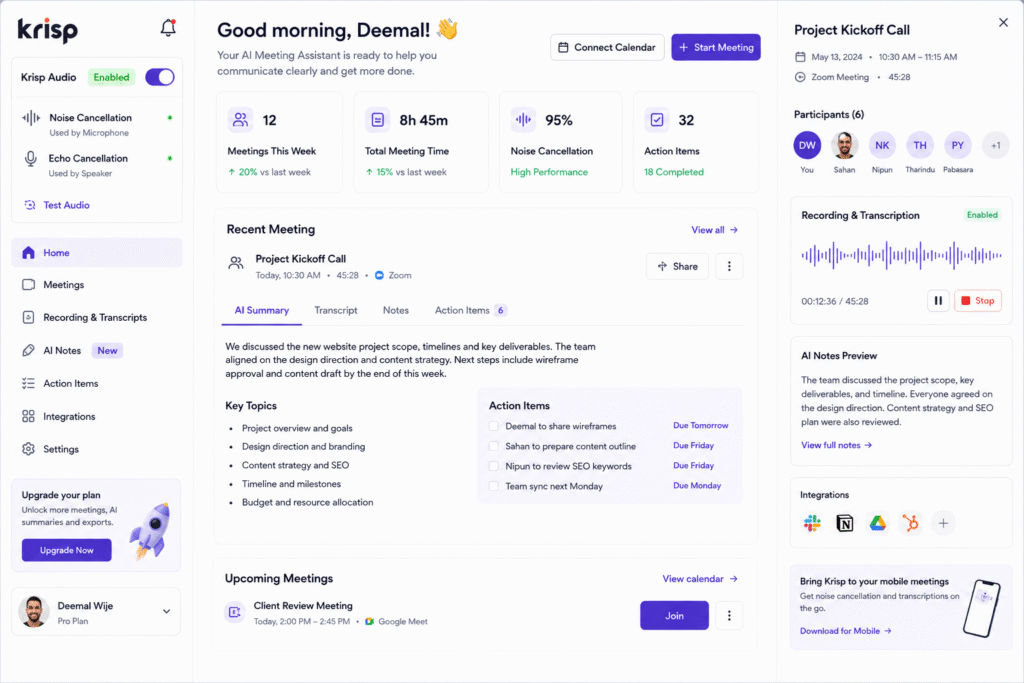
Krisp AI helps solve this by combining AI-powered audio cleanup with meeting transcription and note-taking features. Krisp describes its platform as a voice AI tool for meetings that includes noise cancellation, transcripts, summaries, and AI note-taking across common meeting platforms such as Zoom, Microsoft Teams, Google Meet, Slack Huddles, and more.
The main value of Krisp AI is that it improves both the sound quality and the meeting output. It can remove background noise, create transcripts, generate meeting summaries, and help teams capture action items in one workflow. This makes it useful as an AI meeting assistant, AI noise cancellation tool, meeting transcription AI, AI note taker, meeting summary tool, and voice productivity tool.
How Krisp AI Works
Krisp AI works by improving meeting audio and helping users document conversations. Instead of only recording a meeting, Krisp focuses on making calls clearer while also turning conversations into usable notes.
Krisp’s product pages explain that users can access meeting transcripts, summaries, action items, and recording modes such as Transcript-only, Audio, or Video. This is useful because many meeting tools capture conversations, but they do not always improve the quality of the conversation itself.
For example, if you are working from a noisy room, Krisp can help reduce background noise so others hear you more clearly. After the meeting, the transcript and summary can help you remember key points and follow up faster.
Key Features of Krisp AI
AI noise cancellation
One of the strongest features of Krisp AI is noise cancellation. Krisp says its noise cancellation can remove noise, echo, and cross-talk from meetings.
This is useful for remote workers, freelancers, sales teams, support agents, and anyone who attends calls from different environments. Background noise from keyboards, fans, traffic, family members, cafes, or office chatter can make a meeting feel unprofessional. An AI noise cancellation tool helps reduce those distractions.
For example, a freelancer joining a client meeting from home can sound more professional even if there is background activity. A support agent can speak more clearly to customers. A team member joining from a shared office can reduce unwanted noise during calls.
AI meeting transcription
Krisp AI also supports meeting transcription. Its AI Meeting Assistant documentation says transcription helps users document and understand meetings more efficiently, and it can work even when Krisp microphone or speaker toggles are off.
Meeting transcription AI is helpful because important details can be missed during live calls. A transcript gives users a record they can review later. This is useful for client requirements, sales discussions, project updates, interviews, and training sessions.
For example, after a product meeting, a team can review the transcript to confirm feature requests, deadlines, blockers, and next steps.
Meeting summaries and action items
Krisp AI can also generate meeting summaries and action items. Krisp says its AI Meeting Summary feature can transcribe and summarize meetings, helping teams reduce note-taking time, speed up follow-ups, and stay aligned.
This makes it useful as a meeting summary tool. A long meeting transcript can be difficult to read from start to finish, but a clear summary can show the main discussion points quickly.
A good meeting summary can include:
- Main topics discussed
- Decisions made
- Action items
- Follow-up tasks
- Important deadlines
- Open questions
This helps teams avoid the common problem of ending a meeting without clear next steps.
Meeting note templates
Krisp AI also supports meeting note templates. Krisp’s help center says users can use ready-made templates or create their own, then apply them to meeting transcripts to get summaries in the format that works best for them.
This is useful because not every meeting needs the same format. A sales call, project update, hiring interview, and client review need different note structures.
For example, a sales meeting template may include pain points, budget, decision-maker, timeline, objections, and next steps. A project meeting template may include updates, blockers, decisions, and assigned tasks.
Who Should Use Krisp AI?
| User Type | How Krisp AI Helps |
| Remote workers | Reduce background noise and improve call clarity |
| Agencies | Capture client call notes, decisions, and action items |
| Sales teams | Transcribe calls and summarize follow-up points |
| Customer support teams | Improve voice clarity during customer conversations |
| Project managers | Track meeting decisions and tasks |
| Freelancers | Sound more professional and document client discussions |
Krisp AI is especially useful for people who attend many online meetings and want better audio quality plus clearer meeting notes.
For more similar platforms, you can check the internal guide on AI tools.
Best Ways to Use Krisp AI
To get the best value from Krisp AI, use it before, during, and after meetings.
A simple workflow:
- Install and set up Krisp before your call.
- Select Krisp microphone and speaker in your meeting app.
- Enable noise cancellation when needed.
- Turn on transcription for important meetings.
- Use templates for structured notes.
- Review the meeting summary after the call.
- Check action items before sharing.
- Send follow-up notes to the right people.
For example, if you are handling a client website project, you can use Krisp during the meeting to reduce noise, then use the transcript and summary to prepare a clean follow-up email with agreed changes and deadlines.
Pros and Limitations
Krisp AI has strong benefits, but it should still be used carefully.
Pros:
- Helps remove background noise, echo, and cross-talk
- Supports meeting transcription and summaries
- Helps create action items after meetings
- Works with common meeting platforms
- Useful for remote teams, agencies, sales, and support
- Can improve meeting professionalism and productivity
Limitations:
- Transcripts still need human review
- AI summaries can miss context
- Users should confirm consent before recording or transcribing meetings
- Some features may depend on plan access
- Audio quality can still depend on microphone and environment
- Sensitive meeting content should be handled carefully
The best approach is to use Krisp as a meeting support tool, not as a complete replacement for human review. Always check summaries, action items, and important details before sharing them with a client or team.
FAQ
What is Krisp AI?
Krisp is an AI meeting and voice productivity tool that helps improve call audio, remove noise, transcribe meetings, and generate meeting notes or summaries.
Is Krisp AI an AI meeting assistant?
Yes. Krisp works as an AI meeting assistant because it supports meeting transcripts, summaries, action items, and note-taking workflows.
Can Krisp AI remove background noise?
Yes. Krisp says it can remove background noise, echo, and cross-talk from meetings.
Can Krisp AI transcribe meetings?
Yes. Krisp AI Meeting Assistant includes transcription features that help users document meetings more efficiently.
Can Krisp AI create meeting summaries?
Yes. Krisp Meeting Summary can transcribe and summarize meetings, helping teams reduce note-taking time and improve follow-ups.
Is Krisp AI useful for agencies?
Yes. Agencies can use Krisp to improve client call quality, capture meeting notes, summarize discussions, and track action items after calls.
Final Thoughts
Krisp AI is a strong tool for anyone who wants better online meetings. It helps reduce background noise, improve audio clarity, transcribe conversations, create summaries, and capture action items.
As an AI meeting assistant, it supports better meeting documentation. As an AI noise cancellation tool, it improves call quality. As a meeting transcription AI solution, it helps users remember important details after the call.
If your meetings often suffer from noise, unclear audio, or missed follow-ups, Krisp is worth testing. Start with one recurring meeting, review the transcript and summary, and use the action items to improve your next follow-up.


