Introduction
Planning your day sounds simple, but in real life it can become stressful. You may have tasks in your mind, meetings in your calendar, reminders in different apps, and priorities that keep changing during the day. Without a clear plan, even small tasks can feel overwhelming.
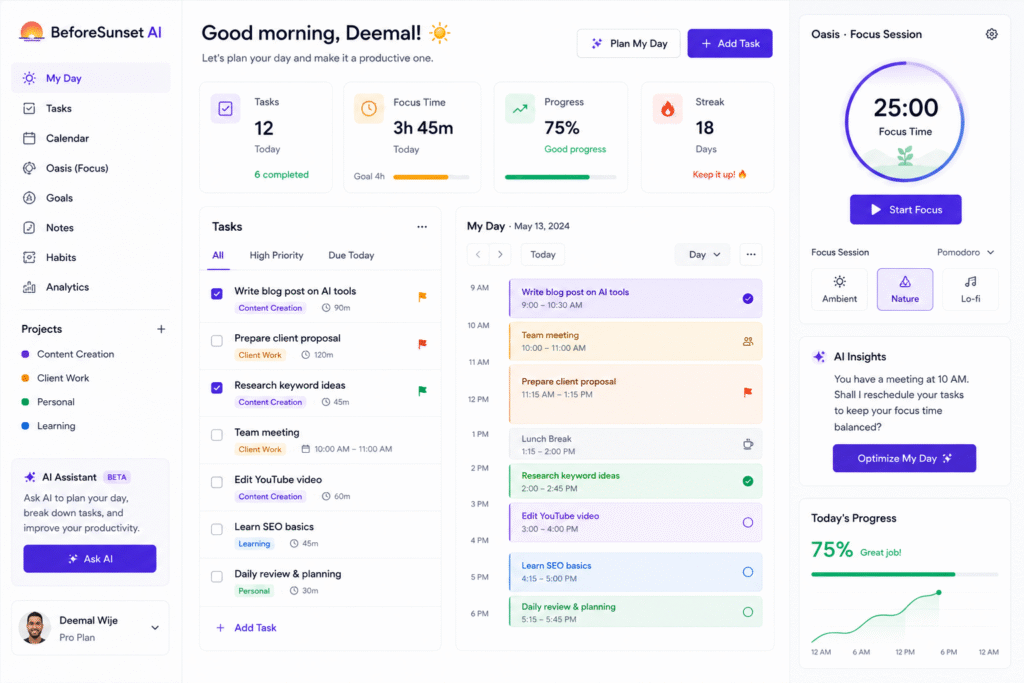
BeforeSunset AI helps solve this problem by turning goals, tasks, calendar events, and focus time into a more organized daily plan. Its features page says users can type goals in natural language, let AI generate structured todos, assign tags, subtasks, and priorities, and then plan the day around those tasks.
The main value of BeforeSunset AI is that it helps users move from a messy task list to a structured day plan. This makes it useful as an AI daily planner, AI task planner, AI productivity planner, smart calendar planner, AI to-do list app, and focus planning tool.
How BeforeSunset AI Works
BeforeSunset AI works by helping users create and organize tasks, then schedule them into a realistic daily plan. Instead of only writing a normal to-do list, users can add tasks, priorities, due dates, and planning preferences.
The “Plan My Day” feature lets users sync a calendar, choose a planning method, and allow AI to organize the day. BeforeSunset AI says users can choose planning styles such as Eat the Frog, Quick Wins, or Batch Similar, depending on how they want to approach their work.
This is useful because not every day should be planned the same way. Some days need deep work. Some days need quick task completion. Some days need batching similar work together, like emails, content writing, or admin tasks.
Key Features of BeforeSunset AI
AI-powered task creation
One strong feature of BeforeSunset AI is AI-powered task creation. Users can type goals or thoughts in natural language, and the tool can turn them into structured tasks with tags, subtasks, and priorities.
This is useful when you know what you want to achieve but do not know how to break it down. For example, instead of writing “finish blog,” you can turn that goal into smaller tasks like research, outline, draft, edit, add images, publish, and share.
As an AI task planner, this helps reduce mental load because the tool supports the planning stage, not only the execution stage.
AI day planning
BeforeSunset AI also helps users plan the full day. The tool can schedule tasks, events, and priorities into a calendar-style view. Its feature page explains that after creating todos and choosing a planning style, users can see tasks automatically scheduled in the calendar.
This makes it useful as a smart calendar planner. A task list tells you what to do, but a calendar plan tells you when to do it.
For example, a content creator can schedule writing in the morning, client work after lunch, admin tasks in the afternoon, and review time before the day ends.
Focus with Oasis
BeforeSunset AI includes a focus feature called Oasis. Its features page explains that users can choose a task, personalize the focus session, set a timer, use background themes or sounds, and work in a distraction-free environment.
This makes it useful as a focus planning tool. Planning is important, but staying focused during the planned time is equally important.
For example, if you schedule one hour to write a blog post, Oasis can help you stay inside that work session instead of jumping between apps.
Calendar and mobile support
BeforeSunset AI also supports calendar-based planning. The Google Play listing says the app can sync with Google Calendar or Outlook, support AI weekly planning, and create recurring tasks for routines.
This is helpful for people who want one view of tasks and events. If your meetings and tasks are separate, your day can quickly become unrealistic. Calendar sync helps make the plan more practical.
Who Should Use BeforeSunset AI?
| User Type | How BeforeSunset AI Helps |
|---|---|
| Students | Plan study sessions, assignments, routines, and focus time |
| Bloggers | Organize research, writing, editing, publishing, and promotion tasks |
| Freelancers | Manage client work, deadlines, follow-ups, and admin tasks |
| Marketers | Schedule campaign work, content tasks, reporting, and meetings |
| Founders | Plan priorities, meetings, strategy work, and personal tasks |
| Busy professionals | Turn scattered tasks into a structured daily schedule |
For more similar platforms, you can check the internal guide on AI tools.
Best Ways to Use BeforeSunset AI
To get better results from BeforeSunset, start each day by entering all important tasks first. Then choose the planning style that matches your energy and workload.
A simple workflow:
- Add all tasks for the day.
- Add due dates and priorities.
- Break big tasks into subtasks.
- Sync calendar events.
- Choose a planning style.
- Let AI schedule the day.
- Use Oasis for focused work.
- Review completed and unfinished tasks at the end of the day.
For example, if you are writing a blog about AI tools, you can create tasks for keyword research, tool research, outline, draft, image generation, alt text, SEO check, and publishing. BeforeSunset can help place those tasks into a realistic day plan.
Pros and Limitations
BeforeSunset AI has strong benefits, but it is not perfect for every user.
Pros:
- Helps turn goals into structured tasks
- Supports daily planning and calendar scheduling
- Useful for subtasks, priorities, and focus sessions
- Helps reduce scattered to-do lists
- Good for students, freelancers, bloggers, and busy professionals
- Supports calendar sync and recurring routines
Limitations:
- AI plans still need human review
- Overplanning can make the day feel too rigid
- Calendar scheduling depends on accurate task time estimates
- Some users may prefer simpler to-do apps
- Advanced features may depend on plan access
- Best results need daily use and regular review
The best approach is to use BeforeSunset as a planning assistant, not as a strict boss. Let it organize the day, then adjust the plan based on real energy, deadlines, and unexpected work.
FAQ
What is BeforeSunset AI?
BeforeSunset is an AI-powered daily planner that helps users create tasks, organize priorities, schedule work, and plan focused productivity sessions.
Is BeforeSunset AI an AI daily planner?
Yes. BeforeSunset works as an AI daily planner because it can help organize tasks, priorities, calendar events, and focus time into a structured day plan.
Can BeforeSunset AI create tasks from goals?
Yes. BeforeSunset says users can type goals in natural language, and AI can generate structured todos with tags, subtasks, and priorities.
Does BeforeSunset AI support calendar planning?
Yes. BeforeSunset supports calendar planning, and its mobile listing says users can sync with Google Calendar or Outlook.
Is BeforeSunset AI useful for bloggers?
Yes. Bloggers can use it to plan research, writing, editing, image creation, SEO checks, publishing, and promotion tasks.
Can BeforeSunset AI improve focus?
Yes. The Oasis feature is designed to create focused work sessions with timers, themes, sounds, and distraction-reducing settings.
Final Thoughts
BeforeSunset AI is a useful tool for people who want a calmer and more structured way to plan their day. It helps users turn goals into tasks, organize priorities, schedule work into a calendar, and focus on one task at a time.
As an AI daily planner, it helps reduce planning stress. As an AI task planner, it breaks down work into clearer steps. As a smart calendar planner, it helps users see when work should actually happen.
If your daily tasks are scattered across notes, calendar events, and mental reminders, BeforeSunset is worth testing. Start with one day, add your real tasks, let AI create a plan, and adjust it into a workflow that feels realistic.


