Introduction
Creating professional videos can be difficult for businesses, educators, marketers, and training teams. A normal video production process may need a camera, presenter, script, studio, lighting, editing software, voiceover, and multiple revisions. This can take time and cost more money.
Synthesia AI helps simplify this process by allowing users to create videos with AI avatars, voiceovers, scripts, and multilingual video tools. Synthesia describes its platform as an AI video platform for business that can create studio-quality videos with AI avatars and voiceovers in 160+ languages.
This makes Synthesia AI useful for training videos, product explainers, onboarding videos, internal communication, sales enablement, and marketing content. It works as an AI avatar video generator, AI video generator, text to video AI tool, AI training video tool, and AI video translator.
How Synthesia AI Works
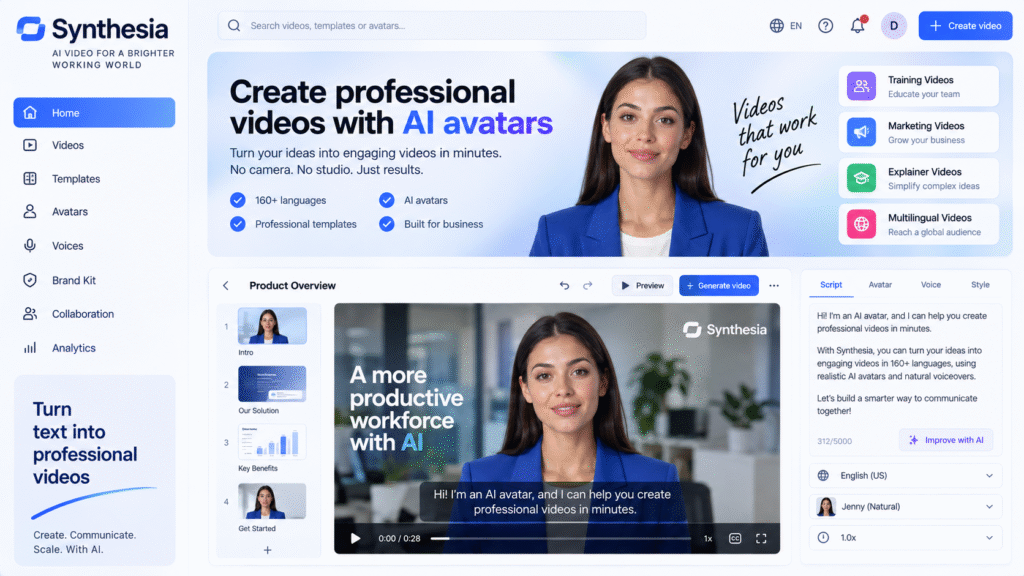
Synthesia AI works by turning written content into presenter-style videos. Users can write a script, choose an avatar, select a voice or language, customize scenes, and generate a finished video.
According to Synthesia’s help center, users can generate videos from a script, PowerPoint, document, link, or prompt. The platform combines AI avatars, voices, motion graphics, and generated media into one workflow.
This is useful because businesses can create videos without filming every time. For example, a company can turn a training document into a video lesson. A marketing team can convert a product script into an explainer video. A HR team can create onboarding videos for new employees.
Key Features of Synthesia AI
AI Avatar Video Generator
The biggest feature of Synthesia AI is AI avatar video creation. Instead of recording a real presenter, users can select an AI avatar to present the script.
This is useful for:
- Training videos
- Product explainers
- Internal company updates
- Course videos
- Sales presentations
- Customer support tutorials
An AI avatar video generator is especially useful when teams need to create many videos quickly. For example, a company may need 20 training videos for employees. Recording all of them manually can take weeks. With Synthesia AI, the team can create script-based videos faster.
Synthesia also provides stock avatars, and its documentation says these stock avatars are created from video footage of real actors who have given consent.
Text to Video AI
Synthesia AI also works as a text to video AI tool. Users can start with written text and turn it into a video with a presenter, voiceover, scenes, and visuals.
A simple workflow:
- Write a script.
- Choose an AI avatar.
- Select a language and voice.
- Add visuals or slides.
- Preview the video.
- Generate and export.
This helps users who do not have video editing experience. Instead of building a video from scratch, they can start with text and create a professional-looking result.
AI Video Translator
One strong use case of Synthesia AI is video translation. Businesses that work with international teams may need the same video in different languages.
Synthesia says it supports videos in 160+ languages and accents, and its translation tools can help localize videos for different viewers.
This is useful for:
- Global training teams
- International marketing campaigns
- Multilingual customer education
- Product tutorials
- Internal company communication
For example, a company can create one English training video and then prepare translated versions for other teams in different countries.
PowerPoint to Video
Many businesses already have training slides, sales decks, and internal presentations. Synthesia AI can help convert these materials into video content.
Instead of asking a presenter to record a full slide presentation, users can turn a PowerPoint or document into a more engaging AI video. Synthesia’s help center notes that videos can be generated from PowerPoint, documents, links, prompts, or scripts.
This is helpful for companies that already have learning materials but want to make them more engaging.
AI Training Video Tool
Synthesia AI is especially useful as an AI training video tool. Many companies need regular training content for employees, customers, or partners.
Examples include:
- Employee onboarding
- Product training
- Compliance training
- Software tutorials
- Safety instructions
- Customer education
Training videos need to be clear, consistent, and easy to update. If a policy changes, a team can update the script and regenerate the video instead of arranging a new recording session.
This makes Synthesia practical for HR teams, learning and development teams, SaaS companies, and enterprise training departments.
Brand Consistency
For business videos, brand consistency is important. A training video, sales video, and product video should all feel like they belong to the same company.
Synthesia supports business video workflows with templates, avatars, voices, and brand-focused editing tools. Synthesia’s feature pages list tools such as AI avatars, video editor, AI voice generator, voice cloning, screen recorder, script to video, and video translator.
This helps teams create videos that look more polished and consistent.
Who Should Use Synthesia AI?
| User Type | How Synthesia AI Helps |
|---|---|
| HR Teams | Create onboarding and training videos |
| Marketing Teams | Produce product explainers and campaign videos |
| Educators | Create lesson-style video content |
| SaaS Companies | Build product tutorials and support videos |
| Sales Teams | Create sales enablement videos |
| Global Businesses | Translate videos for different markets |
Synthesia is best for teams that need professional presenter-style videos without traditional filming.
Best Ways to Use Synthesia AI
A good workflow:
- Start with a clear video goal.
- Write a short and simple script.
- Choose a suitable AI avatar.
- Select the right voice and language.
- Add visuals, slides, or screen recordings.
- Keep each scene short and clear.
- Review the full video before publishing.
- Translate the video if needed.
For best results, the script should sound natural. AI avatar videos work better when the writing is simple, clear, and conversational.
Benefits of Synthesia AI
Main benefits:
- Reduces video production time
- No need for camera or studio setup
- Useful for training and explainer videos
- Supports multilingual video creation
- Helps keep business videos consistent
- Good for teams that create videos regularly
The biggest benefit is speed. Businesses can create and update videos faster than traditional production methods.
Limitations of Synthesia AI
Important limitations:
- AI avatar videos still need human review
- Scripts must be well written
- Emotional storytelling may still need real human presenters
- Brand tone should be checked before publishing
- Some advanced features may depend on the selected plan
- Translated videos should be reviewed by someone who knows the language
Synthesia AI is best used as a business video production assistant, not as a full replacement for creative direction.
FAQ
What is Synthesia AI?
Synthesia is an AI video platform that helps users create videos with AI avatars, voiceovers, scripts, and multilingual video tools.
Is Synthesia AI an AI avatar video generator?
Yes. Synthesia works as an AI avatar video generator because users can create presenter-style videos using AI avatars and scripts.
Can Synthesia AI translate videos?
Yes. Synthesia provides video translation and localization tools, and its language page says it supports 160+ languages and accents.
Can Synthesia AI turn PowerPoint into video?
Yes. Synthesia’s help center says users can generate videos from PowerPoint, documents, links, prompts, or scripts.
Who should use Synthesia AI?
Synthesia is useful for HR teams, marketers, educators, SaaS companies, sales teams, and businesses that need training or explainer videos.
Final Thoughts
Synthesia AI is a useful tool for businesses that need professional videos without a full filming process. It helps users create AI avatar videos, turn scripts into videos, translate content, and update training materials faster.
As an AI avatar video generator, it helps create presenter-style videos. As a text to video AI tool, it turns written content into visual content. As an AI video translator, it helps businesses reach multilingual audiences.
For companies creating training videos, product explainers, onboarding content, or internal communication videos, Synthesia is worth testing as part of a faster business video workflow.


