Introduction
Creating professional presentations can take a lot of time. You may have the right ideas, but turning those ideas into clean slides with good spacing, structure, visuals, and design can be difficult. Many people spend hours adjusting fonts, resizing shapes, fixing alignment, and changing layouts instead of focusing on the message.
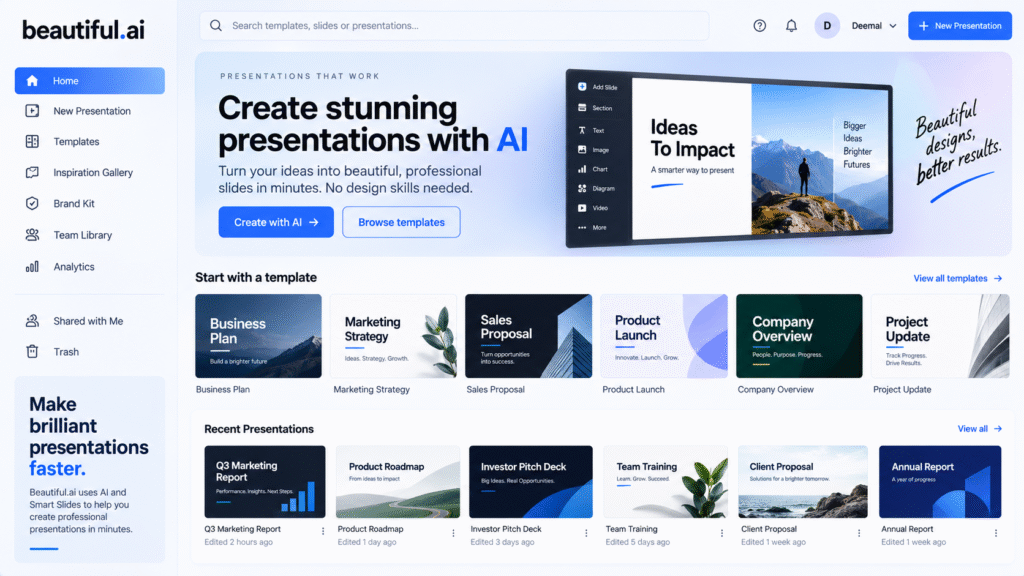
Beautiful.ai helps solve this problem by offering an AI-powered presentation platform with smart slide layouts, templates, and AI presentation creation features. Its support documentation says users can create presentations with AI by entering a prompt, generating a slide-by-slide outline, and then turning that outline into polished slides.
This makes Beautiful.ai useful for marketers, founders, students, agencies, sales teams, educators, and business professionals who need professional-looking decks faster. It works as an AI presentation maker, AI slide design tool, AI pitch deck maker, smart slide templates platform, and AI PowerPoint generator alternative.
How Beautiful.ai Works
Beautiful.ai works by helping users create slides from ideas, prompts, or existing content. Instead of starting with a blank slide, users can describe the presentation they want, review the outline, and allow the platform to build designed slides based on that structure.
This is useful because presentation creation has two major parts: content structure and visual design. Many users can explain their idea, but they may struggle to design each slide professionally. Beautiful.ai reduces that design burden by using intelligent layouts and Smart Slides.
For example, a user can enter a prompt like:
“Create a pitch deck for a new AI marketing platform targeting small businesses.”
The tool can help create a presentation outline and design slides around that topic. The user can then edit the content, change visuals, add brand details, and finalize the deck.
Key Features of Beautiful.ai
AI Presentation Maker
The main feature of Beautiful.ai is AI-assisted presentation creation. The platform helps users move from an idea to a designed presentation faster.
As an AI presentation maker, Beautiful.ai is useful for:
- Business proposals
- Pitch decks
- Marketing plans
- Sales presentations
- Training decks
- Reports
- Educational slides
For example, a marketing manager can create a monthly campaign presentation without manually designing every slide from scratch. A startup founder can create a pitch deck structure faster and then customize the details.
This helps users focus more on the message and less on slide formatting.
Smart Slide Templates
One of the strongest features of Beautiful.ai is its Smart Slides. Beautiful.ai says its templates are powered by Smart Slides, which are intelligent layouts that adapt as users edit content.
This is helpful because normal presentation templates can break easily. When users add more text, images, icons, or charts, the layout may become messy. Smart slide templates help keep the design cleaner by adjusting layout elements automatically.
This makes Beautiful.ai useful as an AI slide design tool because it supports better spacing, alignment, and visual hierarchy without requiring advanced design skills.
For example, if a user adds extra bullet points to a slide, the layout can adjust more smoothly than a static PowerPoint template.
AI Slide Design Tool
Beautiful.ai helps users create slides that look clean and professional. Its DesignerBot page says Smart Slides handle layout decisions such as spacing, alignment, typography, and visual hierarchy so slides stay presentation-ready.
This is useful for non-designers who need business-quality presentations. Instead of manually arranging every object, users can rely on guided layouts and templates.
A good AI slide design tool should help with:
- Clear slide structure
- Balanced spacing
- Consistent typography
- Better visual flow
- Professional design quality
- Faster slide creation
Beautiful.ai is especially helpful for users who need to create slides regularly but do not want to spend too much time on design adjustments.
AI Pitch Deck Maker
Pitch decks need to look professional because they are often used for investors, clients, partners, or leadership teams. A weak presentation design can make even a strong idea feel less convincing.
Beautiful.ai can be used as an AI pitch deck maker because it provides templates and structured slide layouts for business storytelling. The platform includes presentation templates for different use cases, including business and professional presentations.
A pitch deck may include:
- Problem slide
- Solution slide
- Market opportunity
- Product overview
- Business model
- Competitor comparison
- Financial summary
- Team slide
- Closing slide
With Beautiful.ai, users can create these sections faster and keep the design consistent.
Template Library
Beautiful.ai also provides a template library for different presentation needs. The platform says its presentation templates are designed for many use cases and are powered by Smart Slides.
This is useful when users do not know where to start. Instead of building a layout from zero, they can choose a template and customize it.
Templates can help with:
- Marketing reports
- Sales decks
- Business plans
- Project updates
- Training slides
- Case studies
- Product presentations
For agencies and teams, this can reduce repetitive design work.
Inspiration Gallery
Beautiful.ai also has an Inspiration Gallery where users can choose from pre-built slides and add them to a presentation. Its help center says users can choose from hundreds of pre-built slides created with smart templates.
This is helpful when users need slide ideas quickly. For example, if someone needs a timeline slide, comparison slide, dashboard slide, or process slide, they can use the gallery as a starting point.
Who Should Use Beautiful.ai?
| User Type | How Beautiful.ai Helps |
|---|---|
| Marketers | Create campaign decks and reports faster |
| Founders | Build startup pitch decks |
| Sales Teams | Prepare client presentations |
| Agencies | Create professional decks for clients |
| Educators | Design lesson slides |
| Business Teams | Build reports and internal presentations |
Beautiful.ai is best for people who want professional presentations without spending too much time on manual slide design.
Best Ways to Use Beautiful.ai
A simple workflow:
- Define the goal of the presentation.
- Write a clear AI prompt.
- Review the generated outline.
- Customize the slide content.
- Add brand colors, visuals, and data.
- Use Smart Slides to keep layouts clean.
- Review the full deck before presenting.
- Export or share the final presentation.
For example, a business team can create a monthly performance report by starting with an AI-generated outline, adding key metrics, and using smart slide templates to keep the design clean.
Benefits of Beautiful.ai
Main benefits:
- Saves presentation design time
- Helps create professional slides
- Useful for non-designers
- Supports smart slide templates
- Good for pitch decks and reports
- Helps maintain consistent slide layouts
- Useful for business and marketing teams
The biggest benefit is design speed. Beautiful.ai helps users create better-looking presentations without manually fixing every slide element.
Limitations of Beautiful.ai
Important limitations:
- AI-generated slides still need human review
- Content accuracy must be checked
- Some designs may need manual customization
- Brand-specific decks may need extra editing
- Complex creative decks may still need a designer
- AI cannot fully replace presentation strategy
Beautiful.ai is best used as a presentation design assistant, not as a complete replacement for planning and storytelling.
FAQ
What is Beautiful.ai?
Beautiful.ai is an AI-powered presentation platform that helps users create professional presentations using AI, templates, and smart slide layouts.
Is Beautiful.ai an AI presentation maker?
Yes. Beautiful.ai works as an AI presentation maker because users can create presentations from prompts and generate structured slide outlines.
What are Smart Slides in Beautiful.ai?
Smart Slides are intelligent slide layouts that adapt as users edit content, helping presentations stay clean and professional.
Can Beautiful.ai be used for pitch decks?
Yes. Beautiful.ai can be used for pitch decks, business presentations, reports, proposals, and sales decks.
Who should use Beautiful.ai?
Beautiful.ai is useful for marketers, founders, sales teams, agencies, educators, and business professionals who need clean presentations faster.
Final Thoughts
Beautiful.ai is a useful tool for anyone who creates presentations regularly. It helps users move from idea to polished deck faster by combining AI presentation creation, smart slide templates, and professional design layouts.
As an AI presentation maker, it helps create slides from prompts. As an AI slide design tool, it improves layout and structure. As an AI pitch deck maker, it helps founders and business teams prepare professional decks more efficiently.
For marketers, agencies, founders, educators, and business teams, Beautiful.ai is worth testing when presentation design needs to be faster, cleaner, and easier.


