Introduction
Most people save information every day, but finding it later is the hard part. A useful article stays in browser bookmarks, a PDF gets lost in downloads, a screenshot sits in a folder, a YouTube link stays in WhatsApp, and an important note is saved in a random app. After a few weeks, your digital knowledge becomes scattered everywhere.
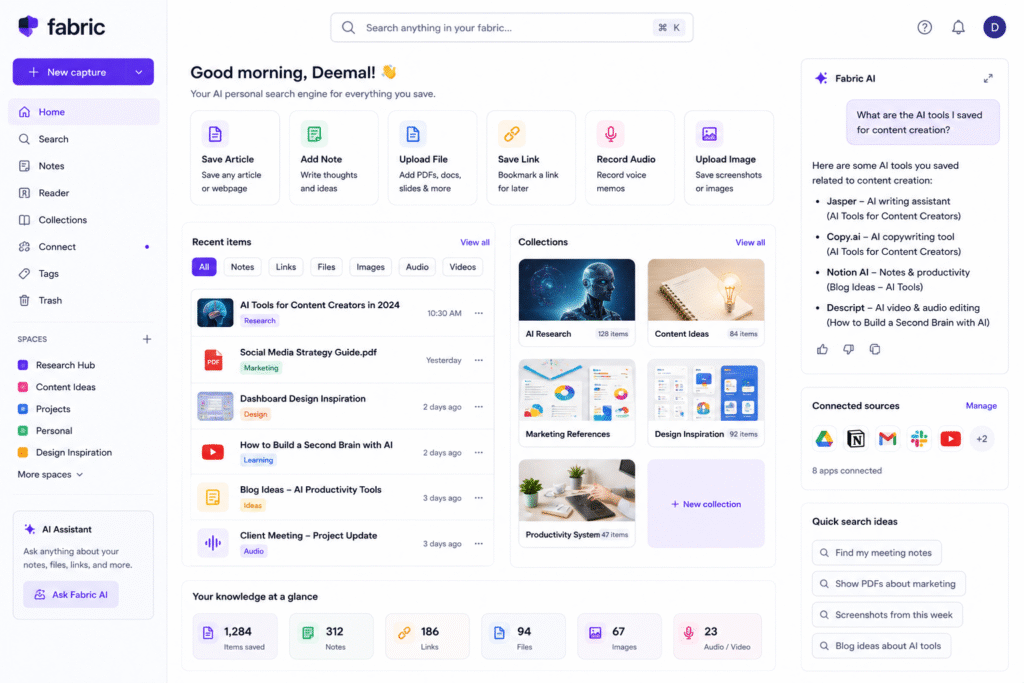
Fabric AI helps solve this problem by giving users one workspace to save, search, connect, and reuse their information. Fabric describes itself as a personal search engine that can search across connected apps, cloud services, files, notes, links, audio, video, and visual content using natural language queries.
The main value of Fabric AI is simple. Instead of remembering where you saved something, you can search what you remember about it. This makes it useful as an AI personal search engine, AI knowledge management tool, AI bookmarking tool, AI research workspace, AI note taking tool, and second brain AI system.
How Fabric AI Works
Fabric AI works by bringing different types of content into one searchable workspace. Users can save notes, PDFs, articles, images, bookmarks, screenshots, documents, audio files, and other research materials. Instead of manually organizing everything into folders, Fabric uses AI search to help users find content by meaning.
This is useful because normal file search depends heavily on filenames or folder locations. If you saved a PDF as “final-report-v2.pdf,” you may forget the name later. But if you remember that the report discussed AI productivity trends, an AI personal search engine can help find it based on meaning.
Fabric’s research page says users can gather PDFs, articles, images, audio, notes, bookmarks, screenshots, and documents into one place, then search across sources with AI. This makes Fabric AI useful for people who collect information from many places.
For bloggers, this can support content research. For designers, it can organize inspiration. For marketers, it can collect campaign references. For students, it can store learning materials. For founders, it can become a second brain AI system for ideas, notes, and product research.
Key Features of Fabric AI
AI personal search engine
The strongest feature of Fabric AI is search. Fabric says its search can work across connected apps and cloud services, understand natural language, search inside audio and video content, and even support visual and color-based searching.
This is helpful when you do not remember the exact title of a saved item. For example, you may search:
- “The article about AI tools for remote teams”
- “The screenshot with the blue dashboard design”
- “The PDF about marketing automation”
- “The note where I wrote blog topic ideas”
- “The video about productivity systems”
This makes Fabric AI useful for people who save many resources but hate manual organization.
AI knowledge management tool
Fabric AI also works as an AI knowledge management tool. Its notes page says Fabric can search notes by meaning, connect notes to documents and files, and use AI to help users think across what they have written.
This is important because knowledge management is not only about saving information. It is about connecting ideas and finding useful information when you need it.
For example, if you are writing a blog about AI tools, you can save competitor articles, pricing pages, statistics, screenshots, and your own notes. Later, you can search across that material and build a better article outline.
AI bookmarking tool
Fabric AI is also useful as an AI bookmarking tool. Instead of saving web pages into browser bookmarks and forgetting them, users can save links into Fabric and make them searchable with notes, highlights, and related files.
Fabric’s reader feature says saved articles, highlights, and annotations are searchable, connected to notes, and accessible to the AI assistant. This is useful for content creators and researchers who collect many online sources.
For example, a marketer can save landing pages, ad examples, SEO articles, and product pages. Later, they can search those bookmarks by topic instead of opening every folder manually.
AI research workspace
Fabric AI can also support research workflows. Its research page describes Fabric as a place to gather, annotate, and search across sources of many types, while using AI to help with synthesis.
This makes it useful for:
- Blog research
- Competitor research
- Academic research
- Product research
- Market trend research
- Client project research
- Content planning
For example, if you are preparing an article about “best AI productivity tools,” you can save official tool pages, pricing pages, screenshots, notes, and comparison articles. Then Fabric can help you search and connect those resources later.
Who Should Use Fabric AI?
| User Type | How Fabric Helps |
|---|---|
| Bloggers | Save sources, notes, screenshots, and content ideas |
| Researchers | Organize PDFs, articles, documents, and references |
| Marketers | Collect landing pages, ads, reports, and campaign ideas |
| Designers | Save visual inspiration, screenshots, and UI references |
| Students | Store study notes, PDFs, bookmarks, and lecture materials |
| Founders | Build a second brain for business ideas, research, and strategy |
Fabric is best for users who save a lot of information but struggle to find it later. It is not as mainstream as Notion, Canva, or Grammarly, but it can be very useful for people who need a personal search and research workspace.
For more similar platforms, you can check the internal guide on AI tool.
Best Ways to Use Fabric AI
To get the best value from Fabric, use it as your central capture system. Do not save ideas in ten different places. Try to bring useful content into one workspace.
A simple workflow:
- Save useful articles and web pages.
- Add PDFs, screenshots, images, and documents.
- Write quick notes when ideas come to mind.
- Save research links for future blog posts.
- Use AI search to find information by meaning.
- Group related material into folders or spaces.
- Use saved resources when writing blogs, reports, or proposals.
- Review and clean your workspace weekly.
This workflow is especially useful for content creators. Instead of starting every article from zero, you can build a research library over time.
Pros and Limitations
Fabric AI has strong benefits, but it is not perfect for every user.
Pros:
- Searches across notes, files, links, images, and saved content
- Supports natural language search
- Useful for research, writing, and personal knowledge management
- Helps reduce scattered bookmarks and files
- Can work as an AI research workspace
- Good for bloggers, researchers, marketers, students, and designers
Limitations:
- May feel unnecessary for users with very simple note needs
- Works best when you save content consistently
- AI search results still need human checking
- Some workflows may require setup time
- Users should be careful with sensitive files and connected apps
- It may not replace full project management tools
AI search tools can save time, but users should still verify important information. Research on AI answer engines has shown that source-backed AI systems can still face issues with factual reliability and citation accuracy, so human review remains important.
FAQ
What is Fabric AI?
Fabric AI is an AI-powered personal search and knowledge workspace that helps users save, organize, and search notes, links, files, PDFs, images, bookmarks, and research materials.
Is Fabric AI an AI personal search engine?
Yes. Fabric AI works as an AI personal search engine because it helps users search across saved content using natural language and meaning-based search.
Can Fabric AI search files and notes?
Yes. Fabric says its search can work across notes, connected apps, cloud services, files, audio, video, and visual content.
Is Fabric AI useful for bloggers?
Yes. Bloggers can use Fabric AI to save research sources, article ideas, screenshots, competitor pages, statistics, and reference links in one workspace.
Can Fabric AI be used as a second brain AI tool?
Yes. Fabric’s second brain page describes workflows for saving articles, emails, newsletters, voice notes, PDFs, images, and ideas, then searching them later in plain language.
Is Fabric AI very popular?
Fabric AI is not as mainstream as tools like Notion, Canva, or Grammarly, but it is useful for people who want AI-powered personal search and knowledge organization.
Final Thoughts
Fabric AI is a smart tool for anyone who saves useful information but struggles to find it later. It helps bring notes, bookmarks, PDFs, images, screenshots, files, and research materials into one searchable workspace.
As an AI personal search engine, it helps users search by meaning instead of exact filenames. As an AI knowledge management tool, it connects notes and sources. As an AI bookmarking tool, it makes saved web content more useful. As an AI research workspace, it helps bloggers, researchers, marketers, and students turn scattered information into reusable knowledge.
If your browser bookmarks, downloads, notes, and screenshots are messy, Fabric AI is worth testing. Start by saving your daily research into one place, then use AI search to find your best ideas when you need them.


