Introduction
Writing clearly is one of the most important skills in work, study, and online communication. Whether you are writing an email, blog post, report, proposal, resume, social media caption, or academic assignment, your message needs to be clear, correct, and easy to understand. The problem is that writing takes time. Even a simple email can become difficult when you are unsure about grammar, tone, structure, or word choice.
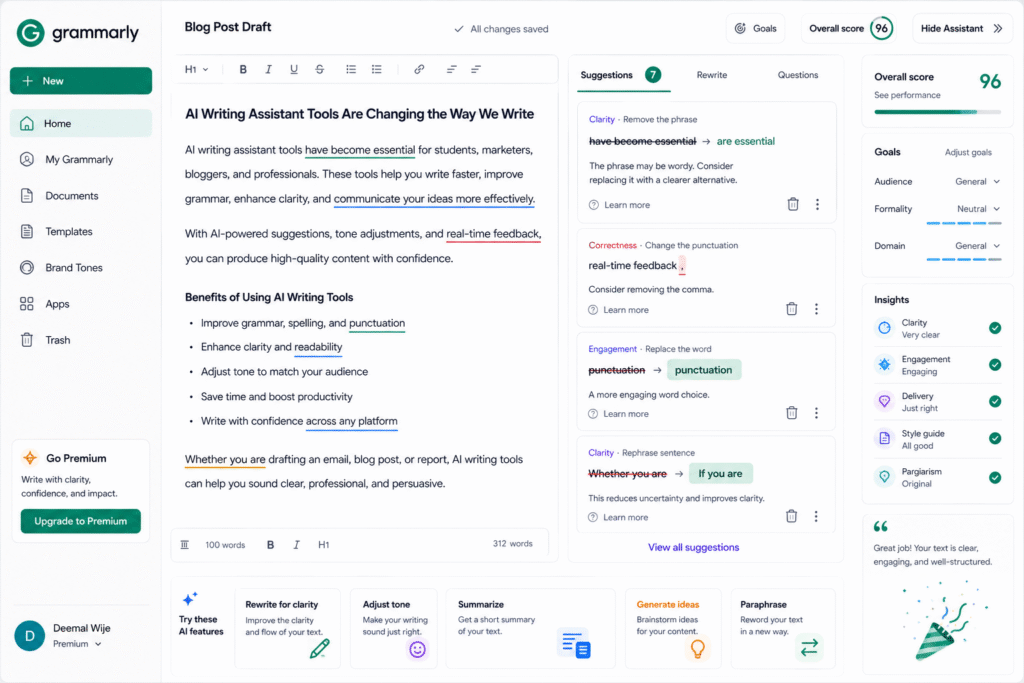
Grammarly AI helps users write faster and communicate better by giving grammar suggestions, rewriting support, tone improvements, and AI-powered writing assistance. Grammarly describes its AI writing assistant as support for every stage of writing, from blank page to final draft.
This makes Grammarly AI useful for students, marketers, business owners, writers, freelancers, customer support teams, and professionals who write every day. It can work as an AI writing assistant, AI grammar checker, AI rewriting tool, writing productivity tool, tone improvement AI, and AI content editor.
In this guide, we will explore how Grammarly AI works, its main features, who should use it, practical use cases, benefits, limitations, and how to use it properly for better writing.
How Grammarly AI Helps Improve Writing
Grammarly is designed to support writing in real time. Instead of waiting until the end of a document to check mistakes, users can receive suggestions while they write. This is useful because many writing problems happen during drafting, not only during final editing.
Grammarly’s support page explains that its algorithms can flag potential issues and provide context-specific suggestions for grammar, spelling, usage, wordiness, style, punctuation, tone, and plagiarism. This makes it more than a basic spelling tool. It helps users improve clarity, structure, tone, and overall communication quality.
For example, a marketer writing a campaign email can use Grammarly AI to make the message more concise and professional. A student can use it to improve grammar and sentence flow. A customer support agent can adjust tone so replies sound polite and helpful.
As an AI writing assistant, it helps users reduce editing time and write with more confidence.
Key Features of Grammarly AI
Grammar and spelling correction
The most common reason people use Grammarly is to check grammar, spelling, and punctuation. Small mistakes can reduce trust, especially in professional emails, client proposals, reports, and published content.
An AI grammar checker is useful because it can identify issues quickly and explain possible improvements. For example, it can help with subject-verb agreement, missing commas, unclear sentences, repeated words, or confusing phrasing.
This is especially helpful for non-native English writers who want to sound more natural and polished. It does not replace learning English, but it can support better daily writing.
Rewriting and clarity improvement
Grammarly AI can also help rewrite text. If a sentence sounds too long, too casual, too formal, or unclear, users can ask for improvements. Grammarly’s generative AI assistance can help users rewrite selected text and use AI writing support inside supported Grammarly apps and surfaces.
This makes it useful as an AI rewriting tool. For example, a sentence like “Please check this and tell me if there are any issues” can be rewritten into a more professional version such as “Please review this and let me know if any changes are needed.”
Rewriting helps when users already have an idea but need a better way to express it.
Tone improvement
Tone is important because the same message can sound friendly, rude, confident, weak, casual, or professional depending on the wording. Grammarly AI helps users understand and adjust tone before sending content.
A tone improvement AI tool is useful for:
- Client emails
- Customer replies
- Job applications
- Sales messages
- Internal team updates
- Formal reports
- LinkedIn posts
For example, if an email sounds too direct, the tool can suggest a softer version. If a message sounds too casual, it can help make it more professional.
AI writing workspace and agents
Grammarly has expanded beyond simple grammar checking. Grammarly’s support documentation says its Docs writing surface includes Grammarly AI writing agents that support writing and revision needs. This helps users work on blog posts, reports, essays, and professional documents in a more guided writing environment.
This is useful for people who want a complete AI content editor rather than only grammar corrections. Writers can draft, revise, summarize, improve, and polish content in one workflow.
Who Should Use Grammarly AI?
Grammarly AI is useful for anyone who writes regularly.
| User Type | How Grammarly AI Helps |
|---|---|
| Students | Improve essays, assignments, grammar, and clarity |
| Bloggers | Edit blog posts, intros, headings, and conclusions |
| Marketers | Write ad copy, emails, captions, and campaign content |
| Business professionals | Improve reports, proposals, and workplace communication |
| Freelancers | Polish client messages and project documents |
| Customer support teams | Create clearer, more professional replies |
As a writing productivity tool, it is especially useful for people who want to reduce editing time and improve communication quality.
For more similar platforms, you can check our internal guide on AI assistant.
Best Ways to Use Grammarly AI
To get better results from Grammarly AI, do not accept every suggestion blindly. Review each recommendation and decide whether it fits your message, audience, and purpose.
A simple writing workflow:
- Write your first draft naturally.
- Use Grammarly to check grammar and spelling.
- Review clarity suggestions.
- Adjust tone based on the audience.
- Use rewrite suggestions only where needed.
- Check the final message yourself.
- Read important content aloud before publishing.
This process helps you keep your own voice while still improving quality.
For example, if you are writing a blog post, use Grammarly after completing the draft. First fix grammar, then improve unclear sentences, then adjust tone, then review keyword usage manually. This gives you a cleaner article without making the content sound too robotic.
Pros and Limitations
Grammarly AI has strong benefits, but users should understand its limits.
Pros:
- Helps correct grammar, spelling, and punctuation
- Improves clarity and sentence flow
- Supports rewriting and tone changes
- Works across many writing situations
- Useful for students, professionals, and content creators
- Saves time during editing and proofreading
Limitations:
- Suggestions may not always match your intended meaning
- AI rewrites can sometimes sound generic
- Human review is still needed for important writing
- It should not replace original thinking
- Some advanced features may require paid plans
- Sensitive business content should be handled carefully
The best approach is to use Grammarly as a writing assistant, not as the final decision-maker. It can improve your draft, but you should still check accuracy, meaning, and context.
FAQ
What is Grammarly AI?
Grammarly is an AI-powered writing assistant that helps users improve grammar, spelling, clarity, tone, rewriting, and professional communication.
Is Grammarly AI an AI writing assistant?
Yes. Grammarly works as an AI writing assistant because it helps users write, rewrite, edit, and polish content faster.
Can Grammarly AI check grammar?
Yes. Grammarly can check grammar, spelling, punctuation, style, tone, wordiness, and other writing issues.
Can Grammarly AI rewrite sentences?
Yes. Grammarly’s generative AI assistance can help users rewrite selected text, improve wording, and adjust writing style.
Is Grammarly AI useful for blog writing?
Yes. Bloggers can use it to improve grammar, clarity, readability, tone, introductions, conclusions, and sentence flow before publishing.
Can Grammarly AI replace a writer?
No. It can support writing and editing, but human creativity, judgment, examples, research, and original ideas are still important.
Final Thoughts
Grammarly AI is a strong choice for anyone who wants to write more clearly and confidently. It helps users correct grammar, improve clarity, rewrite weak sentences, adjust tone, and polish content before sharing or publishing.
As an AI writing assistant, it supports the full writing process. As an AI grammar checker, it helps reduce common mistakes. As an AI rewriting tool, it improves sentence quality. As a writing productivity tool, it saves time for students, professionals, bloggers, and business teams.
The best way to use Grammarly is to write your own draft first, review suggestions carefully, keep your natural voice, and use AI support to improve the final version. If writing is part of your daily work, Grammarly AI is worth testing.


