Introduction
Creating clear documentation is one of the most important parts of running a successful team. Every business has repeated processes that need to be explained again and again. A new employee may need to learn how to use a dashboard. A customer may need help understanding a software feature. A marketing team may need to show how to publish a blog post. A support team may need to explain how to solve common product issues.
The problem is that traditional documentation takes a lot of time. Someone has to record the screen, write the steps, edit the video, create screenshots, add voiceover, format the guide, and then share it with the right people. For busy teams, this can become a slow and repetitive task.
Guidde AI helps solve this problem by using artificial intelligence to create video documentation, step-by-step guides, AI voiceovers, and process documentation faster. Guidde describes its platform as a tool that helps teams create video documentation with AI, including editable slide-by-slide videos, AI voiceover, screenshots, and step-by-step documents. Guidde
This makes Guidde AI useful for product teams, support teams, HR teams, training teams, SaaS companies, agencies, and operations teams that need to document workflows clearly. It works as an AI video documentation tool, AI screen recorder, step-by-step guide creator, AI voiceover tool, and process documentation software.
How Guidde AI Works
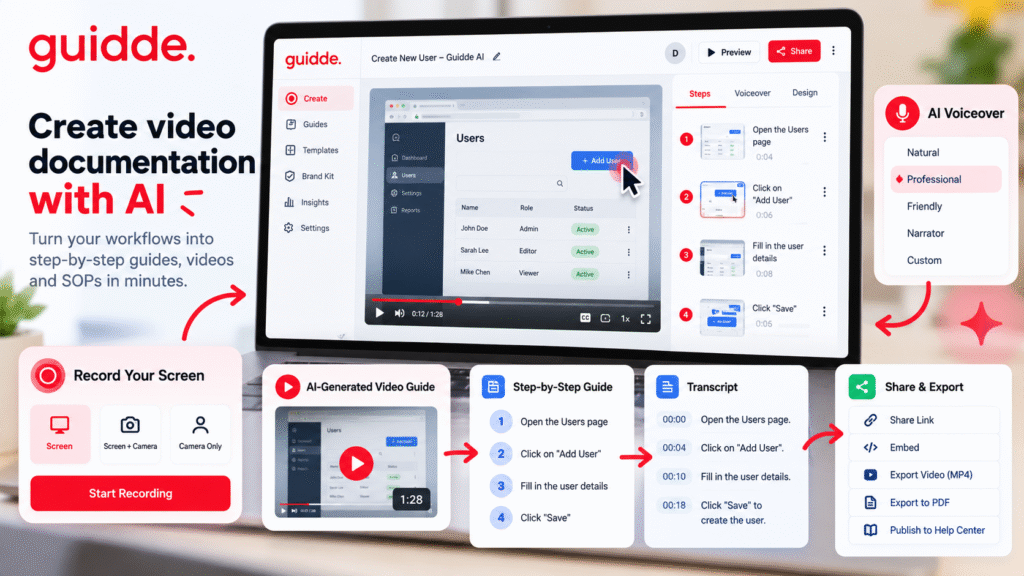
Guidde AI works by helping users capture a workflow and turn it into structured documentation. Instead of writing every step manually, users can record their screen while completing a task. The platform then helps convert that recording into a video guide, transcript, voiceover, and step-based documentation.
Guidde’s Help Center explains that the platform is used to generate instructional videos, voiceovers, and step-by-step guiddes with AI. Guidde Help Center Its FAQ also notes that the platform can track mouse clicks and typed inputs to automatically create how-to videos with matching transcripts. Guidde Help Center
For example, if a team member wants to show how to create a report, they can simply record the process once. Guidde AI can then help create a reusable guide that others can follow later. This reduces repeated explanations and helps teams keep knowledge organized.
A typical workflow looks like this:
- Choose the process you want to explain.
- Start recording the screen.
- Complete the process naturally.
- Let the tool generate a guide.
- Review the steps and transcript.
- Add or edit voiceover.
- Share the guide with the team or customers.
This makes documentation faster and easier for teams that work with software, dashboards, admin panels, CRMs, websites, or internal tools.
Key Features of Guidde AI
AI Video Documentation
The main feature of Guidde AI is AI-powered video documentation. Instead of creating long written instructions, teams can create visual guides that show the exact process on screen.
This is useful for:
- Product walkthroughs
- Software tutorials
- Customer onboarding
- Employee training
- Internal SOPs
- Help center articles
- Feature release guides
- Support documentation
For example, a SaaS company can create a guide showing how to use a new feature. A support team can create a tutorial showing customers how to update account settings. An HR team can create training guides for new employees.
As an AI video documentation tool, Guidde AI is useful because video guides are often easier to understand than plain text. Users can see the clicks, screens, steps, and flow clearly.
AI Screen Recorder
Guidde AI also works as an AI screen recorder. A normal screen recorder simply records the screen, but it does not automatically create a structured guide. The user usually has to edit the recording manually afterward.
Guidde’s FAQ says its desktop capture app can capture on-screen content, track mouse clicks and typed inputs, and create how-to videos with matching transcripts using AI. Guidde Help Center This makes the recording process more useful because the output is not just a raw video. It can become a proper guide.
This is helpful for teams that need to explain software tasks such as:
- Updating website content
- Creating reports
- Managing customer records
- Publishing blog posts
- Using CRM systems
- Completing admin workflows
- Showing product features
Instead of writing instructions from scratch, a team member can record the task once and use Guidde AI to create a clear training asset.
Step-by-Step Guide Creator
One of the best uses of Guidde AI is creating step-by-step guides. Many users do not want to watch a long video from beginning to end. They may prefer a guide that breaks the process into smaller steps.
A step-by-step guide creator is useful because it makes information easier to follow. For example, a guide can show:
- Open the dashboard.
- Click the settings menu.
- Select the required account.
- Update the field.
- Save the changes.
This format is simple and practical. It helps new employees, customers, and internal teams complete tasks without confusion.
Guidde’s desktop application documentation also lists use cases such as how-to tutorials, standard operating procedures, employee training guides, process documentation, and knowledge base articles. Guidde Help Center
This makes Guidde AI especially useful for businesses that want to document repeated processes properly.
AI Voiceover Tool
Voiceover can make a guide more professional, but recording voice manually is not always easy. Background noise, mistakes, unclear pronunciation, or repeated retakes can slow down the process.
Guidde AI includes voiceover features that help improve this workflow. Its screen recording documentation explains that users can enable Magic Mic to turn narration into an AI voiceover during recording. Guidde Help Center The desktop application guide also explains that Magic Mic can combine screen recording, camera, and workflow capture while turning narration into a polished AI voiceover. Guidde Help Center
This is useful for people who do not want to record perfect narration manually. The AI voiceover tool can help make training videos and guides sound more polished.
For example, a support team member can explain a process naturally while recording. Later, the AI voiceover can make the narration cleaner and easier to understand.
Editing and Transcript Support
Good documentation often needs editing. A first recording may include mistakes, long pauses, unclear words, or unnecessary steps.
Guidde provides editing tools for videos, transcripts, captions, and voiceovers. Its Help Center mentions that users can edit videos and transcripts, while the Speaker Editor allows users to edit the AI-generated voiceover or record and upload their own voice. Guidde Help Center
This is important because AI-generated documentation should still be reviewed by a human. The tool can save time, but the final guide must be accurate, clear, and easy to follow.
Editing also helps businesses keep the guide aligned with their brand tone and internal standards.
Process Documentation Software
Every company has processes that should be documented. The challenge is keeping those processes updated and easy to access.
As process documentation software, Guidde AI can help teams document workflows such as:
- How to publish a blog post
- How to create a client report
- How to update website content
- How to onboard a new employee
- How to use a software feature
- How to manage support requests
- How to complete monthly admin tasks
This is useful because undocumented processes create dependency on specific people. If only one person knows how to complete a task, the team becomes vulnerable when that person is unavailable.
With Guidde AI, teams can turn individual knowledge into reusable documentation. This helps reduce repeated questions and improves team efficiency.
Use Cases of Guidde AI
Customer Support
Support teams can use Guidde AI to create help center tutorials. Instead of writing long email replies, they can send customers a guide that shows the process visually.
For example, if customers often ask how to reset a password, connect an account, or use a feature, the team can create one guide and reuse it many times.
Employee Training
HR and operations teams can use Guidde AI to create onboarding materials. New employees can learn internal tools faster when they have visual step-by-step guides.
This is useful for companies that use multiple systems such as CRMs, project management tools, reporting dashboards, or internal admin panels.
Product Education
Product teams can create feature walkthroughs and release guides. When a new feature is launched, a short video guide can help users understand it quickly.
Agency Workflows
Agencies can document internal processes for SEO, social media, reporting, web development, and client communication. This helps new team members follow the correct workflow without asking the same questions repeatedly.
Benefits of Guidde AI
Main benefits include:
- Saves documentation time
- Creates video guides faster
- Supports screen recording workflows
- Helps generate step-by-step guides
- Adds AI voiceover support
- Useful for SOPs and training
- Helps reduce repeated explanations
- Makes internal knowledge easier to share
The biggest benefit is speed. Instead of spending hours writing and editing documentation, teams can record a process and turn it into a reusable guide.
Another benefit is clarity. Visual documentation helps users understand a workflow more easily than text-only instructions.
Limitations of Guidde AI
Although Guidde AI is useful, it still needs human review.
Important limitations:
- AI-generated steps may need correction
- Complex workflows may require manual editing
- Sensitive data should be hidden before recording
- Voiceover may need adjustments
- Brand tone should be reviewed
- Some processes may not be suitable for video format
Guidde’s screen recording documentation also notes that users can blur sensitive information after capture using the video editor. Guidde Help Center This is important for teams that handle customer data, passwords, financial details, or private business information.
Guidde AI should be used as a documentation assistant, not as a complete replacement for process review.
FAQ
What is Guidde AI?
Guidde AI is an AI-powered video documentation platform that helps teams create instructional videos, AI voiceovers, transcripts, and step-by-step guides.
Is Guidde AI an AI video documentation tool?
Yes. Guidde AI works as an AI video documentation tool because it helps teams turn workflows into video guides and reusable documentation.
Can Guidde AI record screen workflows?
Yes. Guidde AI supports screen recording, mouse click tracking, typed input tracking, and AI-generated how-to videos with transcripts. Guidde Help Center
Can Guidde AI create AI voiceovers?
Yes. Guidde AI supports AI voiceover workflows through features such as Magic Mic and Speaker Editor. Guidde Help Center
Who should use Guidde AI?
Guidde AI is useful for product teams, support teams, HR teams, SaaS companies, agencies, operations teams, and businesses that need process documentation.
Is Guidde AI useful for SOP creation?
Yes. Guidde AI is useful for SOP creation because teams can record a process and turn it into a step-by-step guide, video document, or internal training resource.
Final Thoughts
Guidde AI is a practical tool for teams that want to create better documentation faster. It helps turn screen recordings into video guides, AI voiceovers, transcripts, and step-by-step instructions.
As an AI video documentation tool, it helps explain processes visually. As an AI screen recorder, it helps capture workflows. As a step-by-step guide creator, it makes instructions easier to follow. As process documentation software, it helps teams organize internal knowledge.
For businesses that create SOPs, product tutorials, training videos, customer support guides, or internal workflow documentation, Guidde AI is worth testing as part of a faster documentation workflow


