Introduction
Research becomes difficult when your ideas are scattered across browser tabs, PDFs, notes, screenshots, highlights, and random documents. You may save many useful resources, but when it is time to write a blog, prepare a report, study a topic, or make a decision, finding and connecting those ideas becomes the real challenge.
Heptabase AI helps solve this problem by combining visual note-taking, whiteboards, cards, sources, and AI support in one workspace. The official Heptabase site describes features for asking AI to explain sources, take notes, and organize a knowledge base, while also showing whiteboard-based visual note-taking and PDF research workflows.
Unlike a normal notes app, Heptabase AI is designed for visual thinking. Instead of keeping everything in long folders or flat documents, users can place ideas on whiteboards, connect related cards, work with PDFs, and build a clearer map of what they are learning. This makes it useful as an AI research tool, AI note taking tool, visual knowledge management system, AI whiteboard tool, PDF research assistant, and personal knowledge management AI workspace.
How Heptabase AI Works
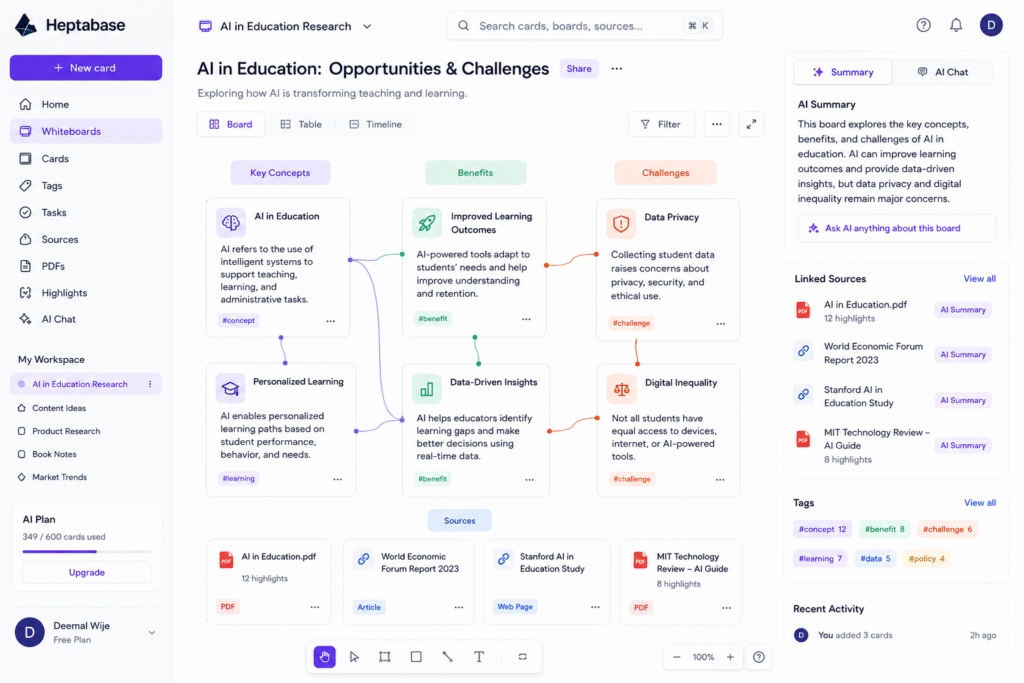
Heptabase AI is built around cards and whiteboards. A card can contain a note, idea, quote, source, summary, or concept. A whiteboard lets users visually arrange those cards so they can see how ideas connect.
This is useful for complex topics because research is rarely linear. For example, if you are researching artificial intelligence in education, you may have separate notes about AI tutors, student privacy, learning outcomes, tools, statistics, and case studies. In a normal document, those ideas may feel disconnected. In Heptabase AI, you can place them visually and build a topic map.
As an AI note taking tool, it helps users capture and structure ideas. As a visual knowledge management tool, it helps users understand relationships between those ideas.
Key Features of Heptabase AI
Visual whiteboards for deep thinking
One of the strongest features of Heptabase AI is its whiteboard structure. A whiteboard gives users a visual canvas where they can arrange cards, group ideas, compare concepts, and build a research map.
This is helpful for:
- Blog research
- Academic study
- Product planning
- Book notes
- Market research
- Content strategy
- Complex topic learning
An AI whiteboard tool is especially useful when you need to understand how ideas relate to each other. Instead of only reading notes from top to bottom, you can move cards around and see patterns.
AI support for sources and notes
Heptabase AI can support research by helping users work with sources and notes. The official site mentions asking AI to explain sources, take notes, and organize the knowledge base. This is valuable because reading and organizing research manually takes time.
For example, if you save a PDF or article, AI can help you understand the key points, extract useful ideas, and turn information into cards. This makes the tool practical for people who read a lot but struggle to convert reading into usable knowledge.
PDF research assistant
Heptabase is useful for PDF-based research. Its official site highlights AI research with PDFs, which makes it suitable for students, researchers, writers, and business analysts who regularly read reports or long documents.
A PDF research assistant can help users move faster through long material. Instead of only highlighting random paragraphs, users can summarize sections, create connected notes, and build a visual structure from the content.
For example, a blogger researching “AI productivity tools” can upload or save several sources, extract key points, and organize them into topic clusters before writing.
Cards, tags, and knowledge structure
Heptabase AI is not only about saving information. It helps users structure information. Cards can be connected, grouped, tagged, and placed inside whiteboards. This makes it useful as personal knowledge management AI.
The benefit is long-term learning. A single note may be useful today, but a connected knowledge system becomes more valuable over time. When you keep adding cards and linking ideas, your workspace becomes a personal research library.
Who Should Use Heptabase AI?
| User Type | How Heptabase AI Helps |
|---|---|
| Students | Organize study notes, PDFs, concepts, and exam research |
| Researchers | Build visual maps from papers, sources, and topic notes |
| Bloggers | Collect sources, create outlines, and connect content ideas |
| Marketers | Research competitors, campaigns, trends, and audience insights |
| Product teams | Map user research, feature ideas, and strategy notes |
| Book readers | Turn reading highlights into connected knowledge cards |
Heptabase AI is best for people who do not only want to save notes, but also want to understand and connect ideas deeply.
For more similar platforms, you can check our internal guide on AI tool.
Best Ways to Use Heptabase AI
To get the best result from Heptabase AI, use it as a thinking workspace, not just a storage app.
A simple workflow:
- Choose one research topic.
- Save articles, PDFs, notes, and references.
- Create cards for important ideas.
- Use AI to summarize or explain difficult sources.
- Place related cards on a whiteboard.
- Group cards by theme.
- Connect ideas that support each other.
- Turn the final structure into a blog outline, study guide, or report.
For example, if you are writing a blog about AI tools for students, you can create cards for tool features, pricing, pros, limitations, examples, and source references. Then you can arrange those cards visually before writing.
This makes the writing process easier because the structure is already clear.
Pros and Limitations
Heptabase AI has strong benefits, but it may not be for everyone.
Pros:
- Great for visual thinking and complex research
- Helps organize notes, PDFs, and sources
- Useful for students, researchers, bloggers, and strategists
- Supports whiteboards, cards, and connected ideas
- Helps turn scattered information into structured knowledge
- Good for long-term personal knowledge management
Limitations:
- May feel advanced for casual note-taking
- Visual systems need consistent use
- Not ideal if you only want a simple checklist app
- Some AI features may depend on plan availability
- AI summaries still need human review
- It may take time to build a useful knowledge base
The best way to use Heptabase is to start with one topic and build slowly. Do not try to organize your entire life in one day.
FAQ
What is Heptabase AI?
Heptabase AI is a visual note-taking and research tool that helps users organize notes, sources, PDFs, and ideas using cards, whiteboards, and AI support.
Is Heptabase AI an AI research tool?
Yes. Heptabase AI works as an AI research tool because it helps users understand sources, organize notes, and build visual research maps.
Can Heptabase AI help with PDFs?
Yes. Heptabase highlights PDF-based AI research workflows, making it useful for reading reports, papers, and long documents.
Is Heptabase AI good for students?
Yes. Students can use it to organize study notes, connect concepts, summarize sources, and build visual topic maps.
Is Heptabase AI better than a normal note-taking app?
It depends on your workflow. If you only need simple notes, a basic notes app may be enough. But if you need visual knowledge management and deep research organization, Heptabase is more suitable.
Is Heptabase AI very popular?
It is not as mainstream as Notion, Canva, or Grammarly, but it is useful for people who want a serious visual research and knowledge management workspace.
Final Thoughts
Heptabase AI is a smart choice for people who want to understand complex topics instead of simply saving random notes. It helps users collect sources, create note cards, organize PDFs, build whiteboards, and connect ideas visually.
As an AI research tool, it supports deeper learning. As an AI note taking tool, it helps structure ideas. As a visual knowledge management system, it helps users see relationships between concepts. As a PDF research assistant, it can support students, bloggers, researchers, and marketers who work with long-form sources.
If your research is scattered across bookmarks, PDFs, notes, and screenshots, Heptabase is worth testing. Start with one topic, create a few cards, use AI to summarize sources, and build a visual map that can later become a blog, report, or study guide.


