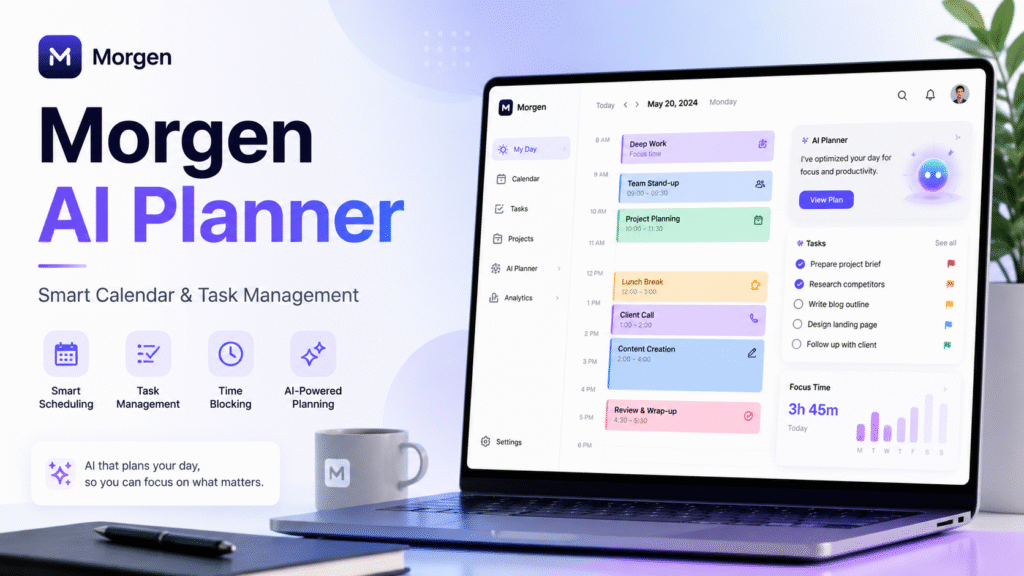
Introduction to Morgen AI Planner
Do you start the day with a clean to-do list, then end it wondering why the important work is still not done? Meetings, emails, client calls, and personal tasks can quickly turn a simple schedule into a messy one. Morgen AI Planner helps solve that problem by bringing calendars, tasks, time blocks, and scheduling into one workflow.
Morgen AI Planner connects what you need to do with when you can realistically do it. Instead of keeping meetings in one app, tasks in another, and booking links somewhere else, you can manage your day from one place. The Morgen official website describes it as an AI daily planner for calendars and tasks, with features for combining calendars, scheduling tasks, time blocking work, protecting focus time, and sharing availability.
In this guide, you will learn how this AI calendar app works, why it is better than a basic checklist, and how to use it as an AI task manager, time blocking app, smart scheduling tool, and calendar task manager.
Why Morgen AI Planner Helps You Plan Better
The main weakness of a normal to-do list is that it does not show time. You may write ten tasks for the day, but your calendar may already be full of meetings. It helps close this gap by turning tasks into scheduled work blocks.
As an AI daily planner, it gives users a clearer view of real capacity. If you have a sales call at 10 AM, a meeting at 2 PM, and a report due today, the app helps you decide where focused work can fit. This makes planning more realistic and reduces the stress of guessing what to do next.
A strong AI calendar app also helps people who manage multiple calendars. Work events, client meetings, personal appointments, and reminders can overlap if they are not viewed together. Morgen brings them into one place, making it easier to avoid double bookings.
Key Features of Morgen AI Planner
Unified calendar management
Morgen lets you bring different calendars into one view. This is useful if you use Google Calendar for work, Outlook for clients, and Apple Calendar for personal plans. A unified AI calendar app helps you understand your full day without switching tools.
Task scheduling
Morgen works as an AI task manager. Instead of leaving tasks in a long list, you can place them directly into your calendar. This turns “prepare monthly report” into a real 90-minute work session instead of a vague reminder.
This is where Morgen becomes a practical calendar task manager. It connects tasks, deadlines, meetings, and availability so your plan matches your actual day.
Time blocking and scheduling
A time blocking app helps protect time for important work. Morgen supports this by letting users reserve focus blocks for writing, planning, coding, studying, reporting, or creative work. The Morgen AI Planner page says its AI Planner can build realistic schedules from tasks and calendars, split large tasks, and let users adjust plans before committing.
Morgen can also be used as a smart scheduling tool. Instead of sending several messages to find a meeting time, you can share availability and let others book a suitable slot.
How to Use Morgen AI Planner Effectively
To get the best results, use Morgen AI Planner as your daily planning center.
Start by connecting all important calendars. This gives the AI daily planner enough context to understand your fixed commitments. Next, add clear tasks. Avoid vague items like “marketing” or “website.” Use action-based tasks such as:
- Write campaign brief
- Review ad performance
- Send client follow-up
- Update landing page copy
- Prepare meeting notes
Then estimate the time needed for each task. A good AI task manager works better when your input is realistic. If a task needs two hours, schedule two hours. If your day is already packed, move lower-priority work instead of forcing everything into the calendar.
Finally, use Morgen as a time blocking app the night before or early in the morning. Review fixed meetings first, add priority tasks second, and keep buffer time for unexpected work.
A simple workflow:
- Review meetings and deadlines.
- Choose three priority tasks.
- Add deep work blocks.
- Schedule quick admin tasks.
- Leave open time for urgent changes.
For more tool comparisons, read our internal guide on AI daily planner tools.
Best Use Cases for Morgen
It works well for freelancers, students, marketers, remote workers, and teams that need a calendar task manager to reduce scheduling confusion.
Suggested meta title: Morgen AI Planner: Powerful Calendar App Guide
Suggested meta description: Learn how Morgen AI Planner helps organize calendars, tasks, time blocking, and smarter daily scheduling in one productivity app.
Suggested URL slug: morgen-ai-planner-guide
FAQ
Is Morgen good for daily productivity?
Yes. Morgen helps users plan tasks around real calendar availability, making daily productivity more realistic.
Is Morgen an AI calendar app?
Yes. Morgen works as an AI calendar app because it combines calendars, tasks, scheduling, and planning features.
Can Morgen replace a to-do list?
It can replace a simple to-do list for many users. For team projects, it can schedule tasks into your calendar.
Does Morgen support time blocking?
Yes. Morgen works well as a time blocking app because it helps reserve focused time for important work.
Who should use Morgen?
Morgen is useful for freelancers, students, marketers, founders, consultants, managers, and remote workers who need a smart scheduling tool.
What is the best way to start?
Start with three priority tasks per day. Schedule them into open calendar slots and review your plan daily.
Build a Smarter Daily Planning System
Morgen AI Planner is valuable because it connects tasks with real time. It helps you see meetings, deadlines, focus blocks, and availability in one place, making it more useful than a basic checklist and more flexible than a simple calendar.
If your current workflow feels scattered, try using Morgen AI Planner for one week. Connect your calendars, add clear tasks, block focus time, and review your schedule every day. Share this guide with someone who needs a better productivity system, and explore more AI tools on The AI Tips.


