Introduction
Most people save useful information everywhere. A good article goes into browser bookmarks, a design idea stays in screenshots, a quote sits in notes, a product link gets lost in WhatsApp, and a research idea ends up inside a random document. After a few weeks, finding that information again becomes difficult.
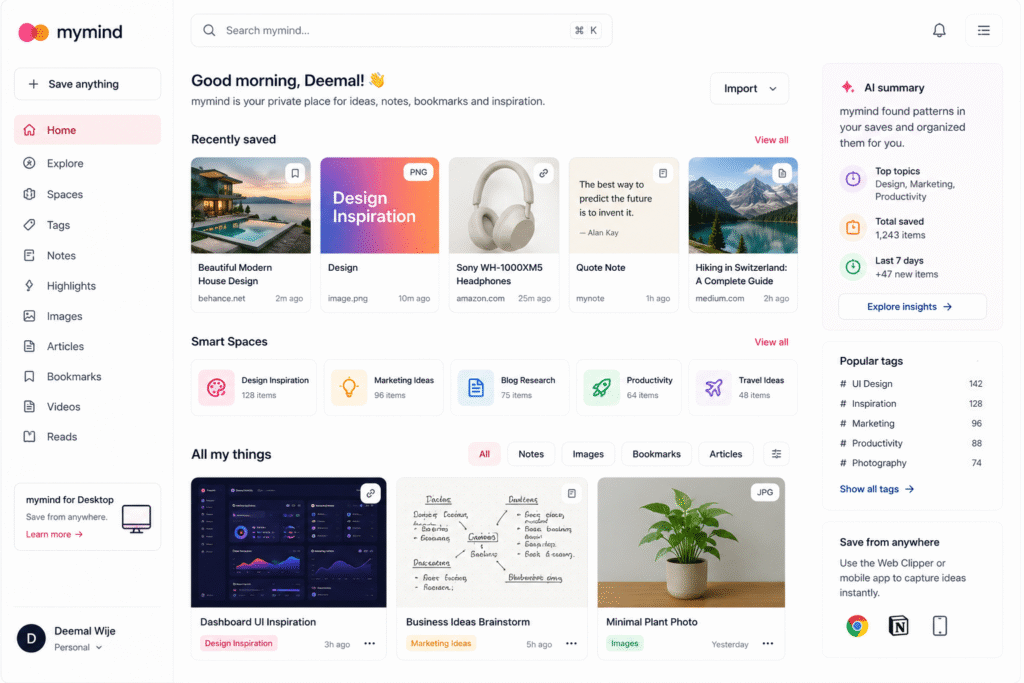
mymind AI helps solve this problem by giving users one private place to save notes, bookmarks, articles, images, products, highlights, videos, screenshots, and ideas. The official mymind website describes it as a private place for notes, bookmarks, inspiration, articles, and images, with AI that understands and remembers what you save.
Unlike many productivity tools, mymind AI does not focus on heavy folders, databases, public sharing, or complex dashboards. The idea is simple: save anything and let AI organize it quietly in the background. This makes it useful as an AI knowledge management tool, AI bookmarking tool, AI note taking app, private AI workspace, visual bookmarking app, and AI personal knowledge management system.
In this guide, we will explore how mymind AI works, who should use it, its best features, practical use cases, limitations, and how to use it for personal research, content planning, and idea management.
How mymind AI Works
mymind AI works like a private memory space for your digital life. Instead of manually creating folders and tags, users can save content and let the platform categorize it automatically. mymind says users do not need to file, label, or tag everything because the system understands what saved items are and helps users find them later.
This is very useful for people who collect information daily. For example, a blogger may save article references, headline ideas, screenshots, quotes, and competitor pages. A designer may save colors, layouts, images, and moodboard inspiration. A marketer may save campaign ideas, product pages, ads, and content examples.
As an AI knowledge management tool, mymind AI reduces the friction of organizing information. The main goal is not to build a complicated productivity system. The goal is to capture ideas quickly and find them again when needed.
Key Features of mymind AI
AI-powered bookmarking
One of the strongest features of mymind AI is intelligent bookmarking. Users can save links, articles, products, and online resources in a visual way. The mymind pricing page says intelligent bookmarks can automatically categorize articles, products, and other bookmarks in a visual format.
This makes it useful as an AI bookmarking tool. Instead of having a browser bookmark folder full of messy links, users can browse saved items visually and search later by keywords, topics, or memory cues.
For example, if you saved a landing page design but forgot the website name, you may still find it by searching related words, colors, or content type.
AI image tagging
mymind AI is also useful for visual research. It can automatically tag images and make them easier to find later. Its pricing page mentions AI image tagging, where saved images are automatically tagged so users can search for them again.
This is helpful for designers, content creators, UI researchers, and marketers. Many visual ideas are saved as screenshots, but screenshots become useless if you cannot find them later. With a visual bookmarking app, your saved images become searchable.
For example, a designer can save website screenshots and later search for “minimal dashboard,” “green button,” “pricing page,” or “dark UI” to find relevant inspiration.
Notes and personal knowledge
mymind AI also works as an AI note taking app. Users can save quick notes, thoughts, ideas, highlights, and research snippets in the same place as bookmarks and images. The official “what is mymind” page says it uses AI and machine learning to help users remember with less effort and can analyze handwritten notes or images containing text.
This is useful because ideas do not always come in one format. Sometimes the best idea is a quote. Sometimes it is a screenshot. Sometimes it is a short note. Sometimes it is a full article. mymind AI allows different types of information to stay together.
Private AI workspace
Privacy is one of the main selling points of mymind. Its official website describes the product as a private place for saved information. This makes it different from tools that are built around public profiles, collaboration, social feeds, or shared databases.
A private AI workspace is useful for personal thinking, research notes, client inspiration, business ideas, and early content planning. Not every idea needs to be shared with a team immediately. Some ideas need a quiet place to grow first.
Who Should Use mymind AI?
mymind AI is useful for people who collect ideas, references, and research often.
| User Type | How mymind AI Helps |
|---|---|
| Bloggers | Save article ideas, references, screenshots, and topic inspiration |
| Designers | Collect moodboards, UI designs, colors, and visual references |
| Marketers | Save campaign ideas, landing pages, competitor examples, and ads |
| Researchers | Store articles, notes, quotes, and source links |
| Students | Organize study materials, screenshots, bookmarks, and notes |
| Founders | Save product ideas, business models, tools, and inspiration |
As an AI personal knowledge management tool, it is best for users who do not want complicated folders or manual tagging.
For more similar platforms, you can check our internal guide on AI tool.
Best Ways to Use mymind AI
To get the best value from mymind, use it as a capture-first tool. Do not spend too much time organizing everything manually. Save useful items quickly and trust the AI to help with search later.
A simple workflow:
- Save useful articles while researching.
- Add screenshots of designs, ads, or landing pages.
- Save quick notes when ideas come to mind.
- Collect quotes and content references.
- Search later using keywords, colors, topics, or memory cues.
- Group useful saves into themes or Smart Spaces.
- Use saved material when writing blogs, planning campaigns, or creating designs.
mymind says Smart Spaces can automatically group saved items around a specific search, theme, or tag. This can help users create topic-based research collections without manually building folders from scratch.
Pros and Limitations
mymind AI has strong benefits, but it is not perfect for everyone.
Pros:
- Simple and clean private workspace
- Saves notes, links, images, articles, and screenshots
- AI automatically organizes and tags saved content
- Useful for visual inspiration and research
- Good for writers, designers, marketers, and students
- Less manual tagging than traditional bookmark tools
Limitations:
- Not ideal for heavy team collaboration
- May not replace full project management tools
- Some users may still prefer manual folders
- Advanced features may depend on paid plans
- AI tagging may not always match your exact intention
- It is better for personal knowledge than structured company databases
The best way to use mymind is as a personal research and inspiration system, not as a replacement for every productivity app.
FAQ
What is mymind AI?
mymind AI is a private AI-powered workspace that helps users save notes, bookmarks, images, articles, screenshots, and ideas in one place.
Is mymind AI an AI knowledge management tool?
Yes. mymind works as an AI knowledge management tool because it helps users capture, organize, and retrieve personal research and saved information.
Can mymind AI save bookmarks?
Yes. It can save links, articles, products, and other online resources, making it useful as an AI bookmarking tool.
Can mymind AI organize images?
Yes. mymind includes AI image tagging, which helps users find saved images later through search.
Is mymind AI good for designers?
Yes. Designers can use mymind to save visual inspiration, screenshots, color ideas, UI examples, and moodboard references.
Is mymind AI very popular?
It is not as mainstream as tools like Canva, Notion, or Grammarly, but it is useful for users who want a quieter private AI workspace for personal research and idea storage.
Final Thoughts
mymind AI is a strong choice for people who collect ideas, links, visuals, notes, and research every day. It gives users one private place to save information without spending too much time organizing folders or tags.
As an AI knowledge management tool, it helps users remember useful information. As an AI bookmarking tool, it keeps saved links more searchable. As an AI note taking app, it supports fast idea capture. As a visual bookmarking app, it is especially useful for designers, bloggers, marketers, and researchers.
If your browser bookmarks, screenshots, notes, and ideas are scattered everywhere, mymind AI is worth testing. Start by saving your daily research into one place, then use search and AI organization to find your best ideas when you need them.


