Introduction
Productivity is not just about doing more tasks. It is about finding information faster, writing better, organizing work clearly, and reducing the time wasted switching between apps. Many people use one tool for notes, another for documents, another for project tracking, and another for meeting summaries. Over time, this creates scattered information and slows down real work.
Notion AI helps solve this by bringing artificial intelligence into the Notion workspace. Notion describes its AI product as a tool that can answer questions, prioritize tasks, and write reports inside a team workspace.
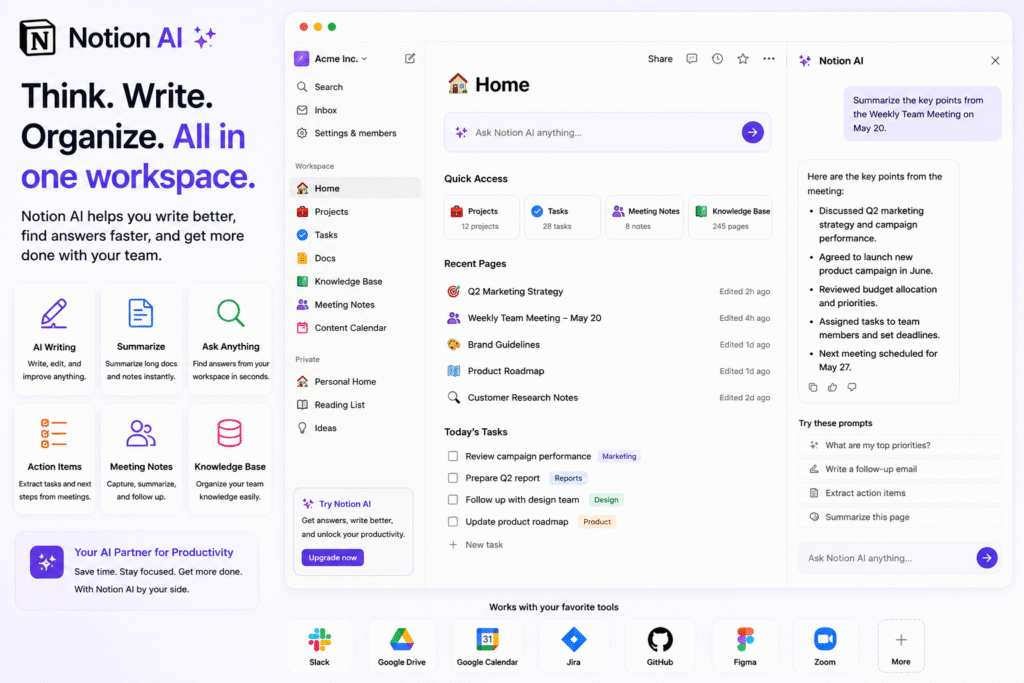
The biggest benefit of Notion AI is that it works where your notes, docs, projects, and team knowledge already live. Instead of copying content into a separate chatbot, users can ask questions, summarize pages, improve writing, generate drafts, and organize ideas inside Notion.
In this guide, we will explore how Notion AI works, who should use it, its key features, practical use cases, pros, limitations, and how it helps as an AI productivity tool, AI workspace assistant, AI note taking tool, AI writing assistant, AI meeting notes solution, and knowledge management AI platform.
How Notion AI Works
Notion AI is designed to support work inside the Notion workspace. This makes it different from a general AI chatbot. A normal chatbot can answer prompts, but it may not understand your workspace content unless you paste information into it. Notion AI can work closer to your documents, notes, projects, and databases.
For example, a marketing team can keep campaign briefs, content calendars, meeting notes, and client updates inside Notion. With an AI workspace assistant, team members can quickly ask for summaries, next steps, or explanations instead of manually opening every page.
Notion’s help guide explains that its AI can provide clear summaries and answer questions by using workspace content and general knowledge. This is useful when teams have large amounts of information stored across many pages.
As an AI productivity tool, it helps reduce time spent searching, rewriting, summarizing, and organizing. This is especially helpful for teams that already use Notion as a central workspace.
Key Features of Notion AI
AI writing assistant
One of the most useful features of Notion AI is writing support. Users can ask it to draft content, improve wording, summarize long text, change tone, or create structured documents.
This makes it useful as an AI writing assistant for:
- Blog outlines
- Project briefs
- Meeting agendas
- Client updates
- Internal documentation
- Social media drafts
- Email copy
- SOP documents
For example, a content marketer can write a rough idea and ask Notion AI to turn it into a clearer article outline. A project manager can use it to improve a weekly update before sending it to stakeholders.
The goal is not to replace human writing. The value is to reduce blank-page time and make editing faster.
Workspace search and answers
A strong knowledge management AI tool should help users find answers from existing information. Notion AI can help users ask questions about workspace content, making it easier to locate important details.
For example, instead of searching manually through many project pages, a team member might ask:
“What were the final decisions from last month’s campaign planning meeting?”
This type of AI workspace assistant is useful for teams that store notes, decisions, tasks, and processes in Notion.
AI note taking and summaries
Notion AI can also help summarize long notes and documents. This is useful when a team has meeting notes, research notes, project updates, or brainstorming pages that are too long to review manually.
As an AI note taking tool, it helps users turn messy notes into cleaner summaries, action items, and next steps. This is especially helpful after meetings or planning sessions.
For example, after a client meeting, a user can add raw notes into Notion and ask the AI to summarize the discussion, identify tasks, and organize the next actions.
AI meeting notes
Notion also offers AI Meeting Notes, which are designed to help capture, organize, and act on meeting responses inside Notion.
This feature can be useful for teams that want meeting documentation to stay connected to projects and tasks. Instead of storing meeting notes separately, teams can keep summaries, decisions, and follow-ups inside the same workspace.
This makes Notion AI helpful for remote teams, agencies, project managers, students, and business owners who attend many meetings every week.
Who Should Use Notion AI?
Notion AI is useful for individuals and teams that already use Notion or want a flexible workspace for notes, docs, tasks, and knowledge management.
| User Type | How Notion AI Helps |
|---|---|
| Content creators | Create outlines, drafts, summaries, and ideas |
| Project managers | Summarize updates, organize tasks, and track decisions |
| Students | Summarize notes, organize research, and improve writing |
| Startups | Build internal docs, SOPs, and team knowledge bases |
| Agencies | Manage client notes, reports, and campaign planning |
| Remote teams | Keep meeting notes and project knowledge searchable |
As an AI productivity tool, it is best for users who want one place to write, plan, store, and search work information.
For more similar platforms, you can check our internal guide on AI productivity tool.
Best Ways to Use Notion AI
To get the best results, keep your workspace organized. AI becomes more useful when your pages, headings, databases, and notes are clear.
Start by creating separate spaces for important work areas, such as:
- Projects
- Meeting notes
- Content calendar
- Client work
- SOPs
- Research
- Personal tasks
Then use Notion AI to support repetitive thinking and writing tasks.
A simple workflow:
- Add meeting notes or project details into Notion.
- Ask the AI to summarize the key points.
- Convert decisions into action items.
- Improve unclear writing.
- Ask questions about workspace content.
- Create reports or updates from existing notes.
- Review and edit the output before sharing.
This workflow helps you use AI as support, not as a replacement for your own thinking.
Pros and Limitations
Notion AI has strong benefits, but it also has limits.
Pros:
- Works inside an existing Notion workspace
- Helps with writing, summaries, and brainstorming
- Supports workspace search and knowledge management
- Useful for notes, docs, projects, and meetings
- Helps reduce manual organizing and rewriting
- Good for individuals, teams, students, and creators
Limitations:
- Output still needs human review
- Workspace organization affects result quality
- It works best if your content is already in Notion
- Some AI features may depend on plan availability
- Sensitive company information should be handled carefully
AI writing and summarization tools are helpful, but human checking is still important. Research on AI-supported writing notes that AI can support drafting, summarization, and revision, but users still need to manage accuracy, evidence, and context.
FAQ
What is Notion AI?
Notion AI is an AI-powered assistant inside Notion that helps users write, summarize, search workspace knowledge, create notes, and organize work more efficiently.
Is Notion AI an AI productivity tool?
Yes. Notion AI works as an AI productivity tool because it helps users save time on writing, summarizing, organizing, and finding information.
Can Notion AI summarize notes?
Yes. Notion AI can summarize long notes, documents, meeting notes, and workspace content to help users understand key points faster.
Is Notion AI good for teams?
Yes. It is useful for teams because it can support shared knowledge, project documentation, meeting notes, and internal reports.
Can Notion AI help with writing?
Yes. It can work as an AI writing assistant by helping draft content, improve wording, change tone, and organize ideas.
Is Notion AI useful for students?
Yes. Students can use it to summarize class notes, organize research, create study plans, and improve written assignments.
Final Thoughts
Notion AI is a strong choice for people who want one workspace for notes, writing, projects, meetings, and team knowledge. It helps users turn scattered information into organized, searchable, and useful content.
As an AI workspace assistant, it helps answer questions and summarize information. As an AI note taking tool, it helps organize messy notes. As an AI writing assistant, it helps create and improve content. As knowledge management AI, it helps teams find information faster.
The best way to use Notion AI is to keep your workspace clean, write clear notes, review AI outputs carefully, and use it to support real productivity. If you already use Notion, this tool can make your workspace faster, smarter, and easier to manage.


