Introduction
Meetings are important, but they can also become one of the biggest productivity problems at work. You join a call, listen to the discussion, write notes, answer questions, and then later try to remember who promised to do what. If you attend many meetings every week, this process can quickly become stressful and time-consuming.
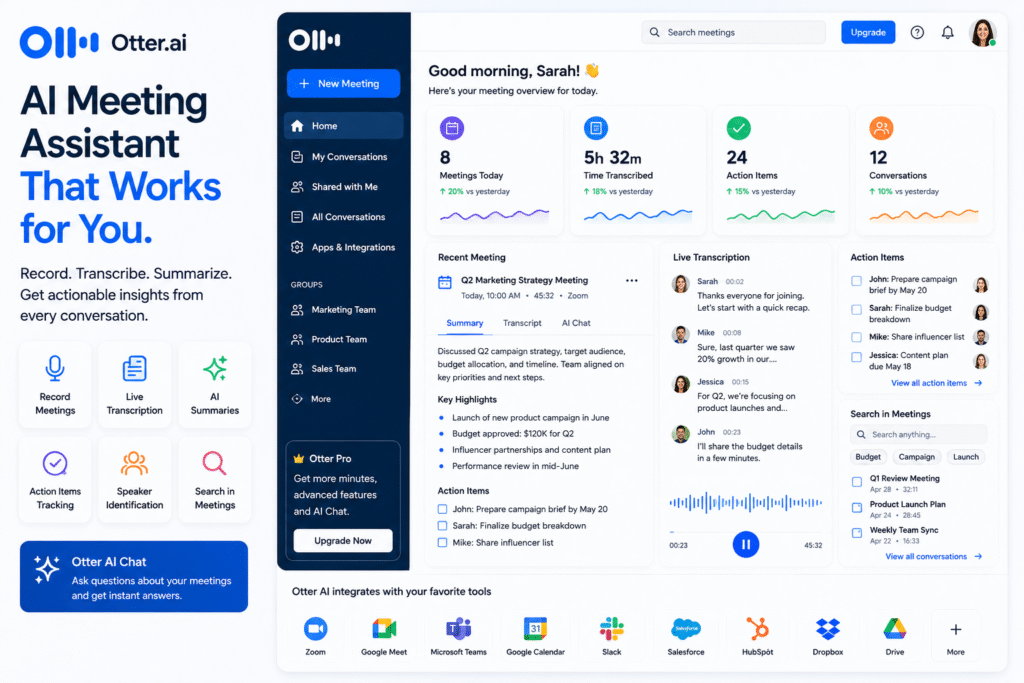
Otter AI helps solve this problem by working as an AI meeting assistant that records conversations, creates real-time transcripts, generates summaries, and captures action items. Otter’s official website describes its Meeting Agent as a tool that supports real-time transcription, live chat, automated summaries, insights, and action items.
The main value of Otter AI is that it turns spoken conversations into searchable, organized meeting knowledge. Instead of depending only on memory or messy manual notes, users can review transcripts, summaries, and key takeaways after the meeting. This makes it useful as an AI transcription tool, meeting notes AI platform, AI note taker, meeting summary tool, and productivity AI tool.
In this guide, we will explore how Otter AI works, its main features, who should use it, its benefits, limitations, and how to use it properly for better meeting productivity.
How Otter AI Works
Otter AI helps users capture and understand meeting conversations more easily. Instead of manually typing notes during a call, users can let the tool transcribe the conversation in real time. This is especially useful for online meetings, interviews, lectures, client calls, and team discussions.
The platform can connect with meeting tools and productivity apps. Otter says it integrates with tools such as Zoom, Slack, Salesforce, Google Drive, Claude, and others. Otter also offers meeting note workflows where its notetaker can connect to Google or Microsoft calendars and automatically join meetings on Zoom, Microsoft Teams, and Google Meet.
This makes Otter AI useful for people who do not want to miss important meeting details. For example, a project manager can review decisions after a client meeting. A sales representative can check customer objections. A student can revisit lecture points. A recruiter can review interview answers.
An AI meeting assistant is not just about recording audio. The real benefit is converting meeting content into useful information that people can search, share, and act on.
Key Features of Otter AI
Real-time transcription
One of the strongest features of Otter AI is real-time transcription. This allows users to follow the meeting conversation as text while the meeting is happening.
As an AI transcription tool, it helps reduce the pressure of taking notes manually. If someone explains a technical point or gives an important update, the transcript can help users review it later.
Real-time transcription is useful for:
- Team meetings
- Sales calls
- Client briefings
- Online classes
- Interviews
- Webinars
- Internal training sessions
This feature is especially helpful for people who need accurate meeting records or want to stay focused on the discussion instead of typing notes.
Automated meeting summaries
Long meetings can be hard to review. A one-hour meeting transcript may contain thousands of words. Reading everything again can take too much time.
Otter AI helps by generating summaries and key takeaways. Otter’s meeting notes page highlights real-time notes, summaries, automated action items, and AI chat as part of its meeting workflow.
This makes it useful as a meeting summary tool. Instead of reviewing the full transcript from start to finish, users can first check the summary and then open specific transcript sections if needed.
For example, after a weekly marketing meeting, the summary may show campaign updates, pending approvals, blockers, and next steps. This helps the team move faster after the call.
Action item tracking
Meetings often fail because follow-up tasks are forgotten. Someone may say, “I will send the report tomorrow,” but after the meeting, nobody tracks it properly.
Otter AI helps capture action items. Otter’s help center says the Action Items tab consolidates and shows action items assigned to the user across conversations.
This is important for teams because action items create accountability. A meeting notes AI tool becomes more valuable when it does not only record what happened, but also helps people remember what needs to happen next.
Otter AI Chat
Otter also includes AI chat features for meetings. Otter explains that AI Chat can answer questions about meeting content and help generate content such as follow-up emails.
This is useful when users need quick answers from meeting history. For example, instead of reading a full transcript, you can ask what decisions were made or what tasks were assigned.
As an AI note taker, this helps turn meeting information into a searchable knowledge base.
Who Should Use Otter AI?
Otter AI is useful for anyone who regularly attends meetings or needs accurate conversation records.
| User Type | How Otter AI Helps |
|---|---|
| Project managers | Track decisions, blockers, and action items |
| Sales teams | Review customer calls and follow-up points |
| Recruiters | Capture interview notes and candidate responses |
| Students | Record lectures and summarize key ideas |
| Consultants | Keep client meeting notes organized |
| Remote teams | Improve async communication and meeting documentation |
As a productivity AI tool, it is especially helpful for remote and hybrid teams. When people cannot attend every meeting live, summaries and transcripts help them catch up later.
For more similar platforms, you can check our internal guide on AI meeting assistant.
Best Ways to Use Otter AI
To get the most from Otter AI, use it as part of a clear meeting workflow. Do not only record meetings and forget about them. Review the notes, confirm decisions, and turn action items into real tasks.
A simple workflow:
- Connect your calendar.
- Allow Otter to join important meetings.
- Review the live transcript during or after the call.
- Check the meeting summary.
- Confirm action items with your team.
- Share notes with people who need them.
- Search old meetings when you need context.
For better results, also use clear meeting agendas. AI can summarize better when the meeting has structure. Start with the topic, discuss key points, confirm decisions, and end with action items.
Pros and Limitations
Otter AI has many benefits, but users should understand its limits.
Pros:
- Saves time on manual note-taking
- Creates real-time meeting transcripts
- Generates summaries and key takeaways
- Helps track action items
- Supports meeting search and AI chat
- Useful for teams, students, sales, and client work
Limitations:
- Transcription accuracy can depend on audio quality
- Sensitive meetings need privacy consideration
- AI summaries should be reviewed before sharing
- Some advanced features may depend on plan limits
- It should not replace human judgment in important decisions
AI meeting tools are helpful, but users should still check important details. Research on LLM-based meeting recap systems notes that AI summaries can help with meeting clarity, but they may miss personally relevant details or create attribution issues, so human review is still important.
FAQ
What is Otter AI?
Otter AI is an AI meeting assistant that helps users record meetings, transcribe conversations, create summaries, capture action items, and search meeting content.
Is Otter AI an AI transcription tool?
Yes. Otter AI works as an AI transcription tool because it converts spoken conversations into written transcripts in real time.
Can Otter AI summarize meetings?
Yes. Otter AI can generate meeting summaries, key takeaways, and action items, helping users review meeting content faster.
Does Otter AI work with Zoom and Google Meet?
Otter supports meeting workflows across platforms such as Zoom, Microsoft Teams, and Google Meet through calendar and meeting integrations.
Is Otter AI useful for students?
Yes. Students can use Otter AI to record lectures, review transcripts, summarize lessons, and revisit important discussion points.
Can Otter AI replace manual meeting notes?
It can reduce manual note-taking, but important summaries and action items should still be reviewed by a person before sharing or acting on them.
Final Thoughts
Otter AI is a strong choice for anyone who wants to make meetings easier to manage. It helps turn conversations into transcripts, summaries, action items, and searchable knowledge.
As an AI meeting assistant, it reduces the pressure of manual note-taking. As an AI note taker, it helps keep important details organized. As a meeting summary tool, it saves time after long calls. As a productivity AI tool, it helps teams stay aligned and follow through on decisions.
The best way to use Otter AI is to connect it with your meeting workflow, review summaries after each call, confirm action items, and share clean notes with the right people. If meetings take up a large part of your week, Otter AI is worth exploring.


