Introduction
Most people save useful articles, PDFs, newsletters, videos, and research links with good intentions. But after a few days, those resources become hard to find, hard to finish, and even harder to remember. Browser bookmarks become messy, screenshots disappear in folders, and important highlights stay trapped inside different apps.
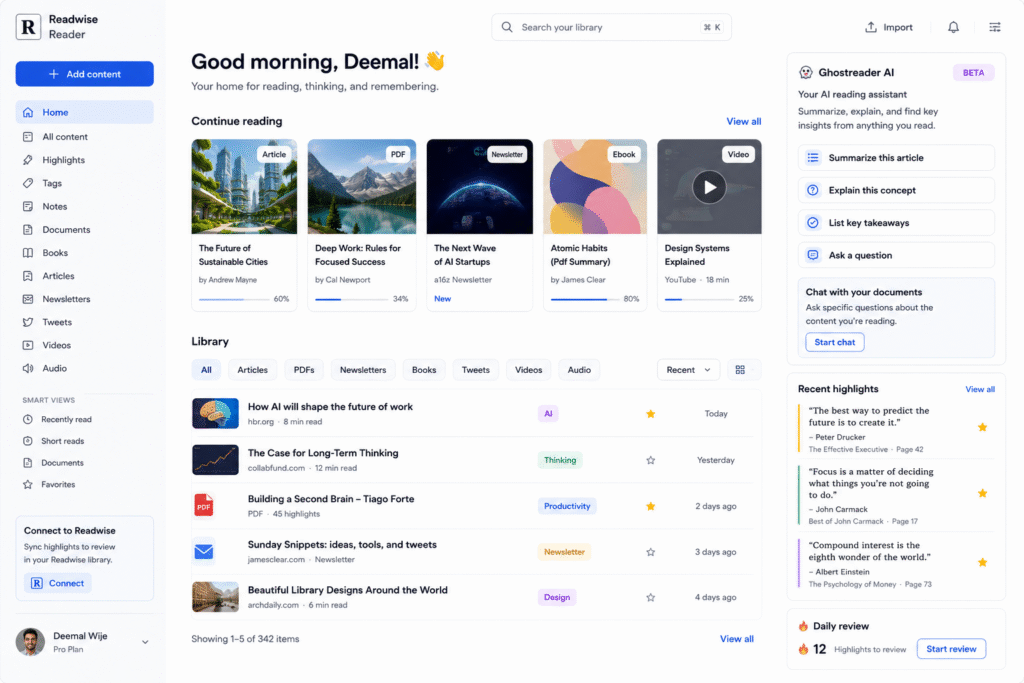
Readwise Reader AI helps solve this problem by giving users one focused reading workspace for articles, PDFs, ebooks, newsletters, RSS feeds, highlights, notes, and AI-powered reading support. Readwise describes Reader as an all-in-one reading app where users can highlight, annotate, and sync notes to their Readwise library for later review.
The biggest value of Readwise Reader AI is that it is built for people who read and research seriously. Instead of only saving links, users can actually read, highlight, summarize, ask questions, and revisit important ideas. This makes it useful as an AI reading assistant, AI read it later app, AI knowledge management tool, AI highlighting app, Ghostreader AI workspace, and personal research tool.
In this guide, we will explore how Readwise Reader AI works, who should use it, its key features, practical use cases, benefits, limitations, and how to use it for better content research and learning.
How Readwise Reader AI Works
Readwise Reader AI works as a central reading inbox. Users can save articles, PDFs, newsletters, ebooks, RSS feeds, Twitter threads, and other reading materials into one place. Then they can read inside Reader, highlight important passages, add notes, and sync highlights into Readwise for review. Reader’s official page says it is designed as a read-it-later app for serious readers and automatically syncs highlights to Readwise.
This is useful because research is not only about collecting links. The real value comes from understanding, saving, and reusing important ideas later. A blogger may save competitor articles, topic references, statistics, and quote ideas. A student may save academic PDFs and lecture materials. A marketer may save trend reports, product pages, and newsletters.
As an AI read it later app, Readwise Reader AI helps reduce scattered research. Instead of keeping information across many tabs and apps, users can create one reading workflow.
Key Features of Readwise Reader AI
Ghostreader AI for summaries and explanations
One of the most useful features of Readwise Reader AI is Ghostreader AI. Readwise describes Ghostreader as Reader’s AI-powered assistant that can summarize documents, look up terms, explain concepts, translate passages, draft newsletter blurbs, and more.
This is helpful when reading long or complex content. For example, if you save a 3,000-word article about artificial intelligence trends, Ghostreader AI can give you a quick summary before you decide whether to read the full piece. If you find an unfamiliar concept, it can explain the idea in context.
As an AI reading assistant, this makes reading faster and more active. You are not only consuming information. You are asking questions, clarifying meaning, and turning reading into usable knowledge.
Chat with documents
Readwise Reader also supports document chat through Ghostreader. Its documentation explains that the language model can access the underlying document, metadata, and reading position, making it useful for extracting details, answering questions, and applying ideas from the document to specific situations.
This is especially useful for PDFs, research papers, long-form articles, and reports. Instead of searching manually through a document, users can ask questions such as:
- What are the main takeaways?
- What does the author recommend?
- What examples are mentioned?
- What are the weaknesses in this argument?
- How can I use this idea in a blog post?
This turns Readwise Reader AI into a personal research tool for deeper reading.
Highlighting and note organization
Readwise Reader AI also works well as an AI highlighting app. Users can highlight important ideas while reading and save notes alongside the content. According to Readwise documentation, highlights and notes in Reader sync to the Readwise library for organization and review.
This is valuable for people who create content from research. A blog writer can collect useful quotes, examples, and references. A student can save important definitions. A founder can collect ideas from business books and newsletters.
The key benefit is retention. Saving highlights makes it easier to revisit useful information instead of forgetting everything after reading.
Text to speech reading
Reader also supports audio-style reading. The official Reader page says it can turn articles, PDFs, and ebooks into audio with natural AI voices, adjustable speed, and support for many languages.
This can help users consume saved content while walking, traveling, exercising, or doing low-focus tasks. For busy professionals, this is a practical way to reduce unread article backlogs.
Who Should Use Readwise Reader AI?
Readwise Reader AI is best for people who read, research, and save information regularly.
| User Type | How Readwise Reader AI Helps |
|---|---|
| Bloggers | Save sources, summarize articles, collect highlights, and build blog ideas |
| Students | Read PDFs, summarize notes, and review key ideas |
| Marketers | Save newsletters, reports, competitor pages, and trend research |
| Researchers | Organize papers, highlights, and document notes |
| Founders | Save product ideas, business articles, and strategic insights |
| Content creators | Turn reading material into outlines, posts, and scripts |
As an AI knowledge management tool, it is especially useful for people who want a serious reading system instead of a simple bookmark folder.
For more similar platforms, you can check our internal guide on AI reading assistant.
Best Ways to Use Readwise Reader AI
To get the best value from Readwise Reader AI, build a repeatable reading workflow. Do not only save articles and forget them.
A simple workflow:
- Save articles, PDFs, newsletters, and research links into Reader.
- Use Ghostreader AI to summarize long content first.
- Read the most useful pieces fully.
- Highlight important ideas, examples, and statistics.
- Add short notes in your own words.
- Ask document-specific questions when needed.
- Sync highlights to Readwise.
- Reuse insights for blogs, reports, scripts, or study notes.
This workflow helps turn reading into action. Instead of passively collecting information, you create a system for learning and content creation.
Pros and Limitations
Readwise Reader AI has strong benefits, but it is not for everyone.
Pros:
- Combines reading, highlights, notes, and AI support
- Useful for articles, PDFs, newsletters, and ebooks
- Ghostreader AI can summarize and explain content
- Helps organize research in one workspace
- Good for bloggers, researchers, students, and marketers
- Supports better long-term knowledge retention
Limitations:
- It may feel advanced for casual readers
- Best results come when users read and highlight consistently
- Some AI features may depend on plan access or settings
- AI summaries still need human checking
- It is not a full project management or writing platform
- Users still need to verify important facts from original sources
The best way to use Readwise Reader AI is as a reading and research companion, not as a replacement for your own thinking.
FAQ
What is Readwise Reader AI?
Readwise Reader AI is a reading and research tool that helps users save articles, PDFs, newsletters, ebooks, highlights, and notes, while using Ghostreader AI for summaries and document questions.
Is Readwise Reader AI an AI reading assistant?
Yes. It works as an AI reading assistant because Ghostreader AI can summarize documents, explain concepts, define terms, translate passages, and help users understand saved content.
Can Readwise Reader AI summarize articles?
Yes. Ghostreader AI can summarize documents inside Reader, helping users understand long articles or PDFs faster.
Is Readwise Reader good for bloggers?
Yes. Bloggers can use it to save research sources, highlight useful ideas, summarize content, and collect material for future articles.
Can Readwise Reader AI handle PDFs?
Yes. Reader supports PDFs, and its official page says Reader can turn articles, PDFs, and ebooks into audio while supporting reading and highlighting workflows.
Is Readwise Reader AI very popular?
It is not as mainstream as tools like Notion, Canva, or Grammarly, but it is highly useful for readers, researchers, writers, and content creators who want a focused knowledge workflow.
Final Thoughts
Readwise Reader AI is a strong choice for anyone who reads a lot and wants to remember more of what they learn. It brings saved articles, PDFs, newsletters, highlights, notes, summaries, and AI document chat into one reading workspace.
As an AI reading assistant, it helps users understand content faster. As an AI highlighting app, it helps capture important ideas. As an AI knowledge management tool, it supports long-term learning and research. As a personal research tool, it is valuable for bloggers, students, marketers, and researchers.
If your useful articles, notes, screenshots, and PDFs are scattered everywhere, Readwise Reader AI is worth testing. Start by saving your daily reading into one place, then use Ghostreader AI and highlights to turn information into usable knowledge.


