Introduction
Most productivity tools help you write notes, create tasks, or save ideas. But the real problem starts later. Your notes become messy, meeting decisions get buried, tasks are scattered, and useful ideas disappear inside different pages. If you work with research, client projects, meetings, content planning, or product ideas, a simple notes app may not be enough.
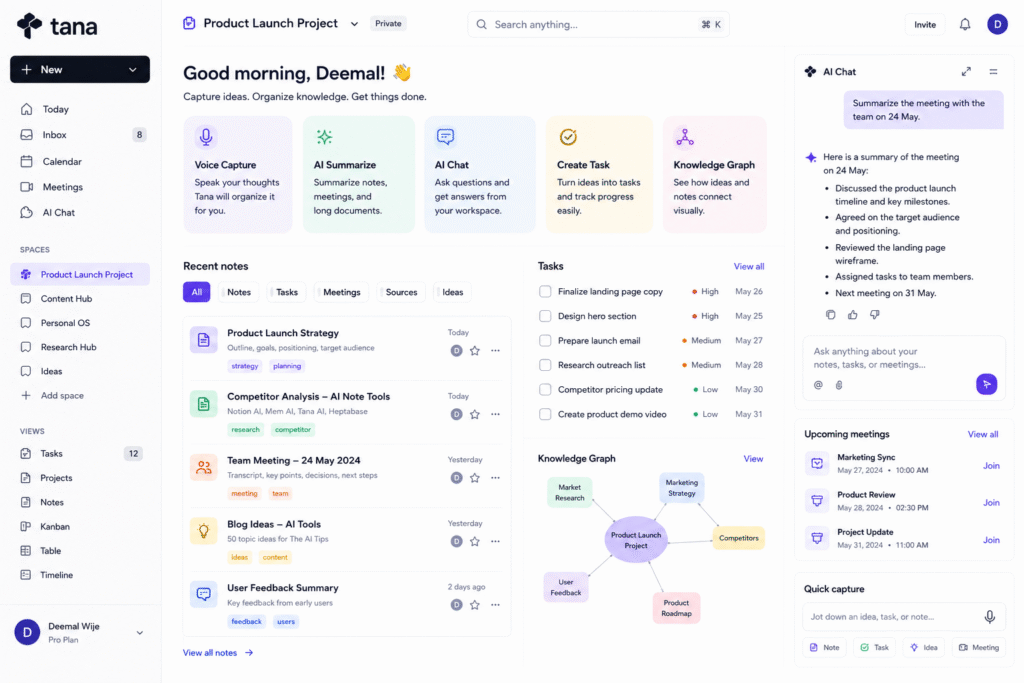
Tana AI is designed to solve this problem by combining notes, tasks, meetings, AI chat, voice input, and structured knowledge in one workspace. Tana’s official help documentation explains that its AI can read documents, types, fields, meeting transcripts, calendar events, tables, attached PDFs, uploaded audio and video, and more. It can also create docs, tasks, typed entries, types with fields, skills, artifacts, AI-generated images, and calendar events.
The main value of Tana AI is structure. Instead of keeping notes as plain text, users can turn information into organized knowledge using supertags, fields, and connected workflows. This makes it useful as an AI knowledge tool, AI note taking tool, AI meeting assistant, AI workflow automation system, knowledge graph tool, and AI productivity workspace.
How Tana AI Works
Tana AI works differently from a basic note-taking app. In a normal notes app, users write information into pages or folders. Over time, those pages can become hard to search and reuse. Tana focuses more on structured notes. This means your notes can behave like tasks, meetings, projects, people, ideas, or sources depending on how you tag and organize them.
One of Tana’s key ideas is the use of supertags. Supertags allow users to turn notes into structured objects with fields. For example, a simple note can become a task with a deadline, a meeting note with participants, or a project idea with status and priority. This makes Tana AI useful for people who want flexible knowledge management without building a heavy database from scratch.
Tana’s outliner page describes the tool as a place where users can capture fast, supertag notes, and turn information into structured knowledge that can be searched, filtered, and reused. It also mentions AI features such as live voice transcription, meeting summaries, extracting insights from meeting transcripts, and chatting with notes as context.
Key Features of Tana AI
AI note taking tool
Tana AI can help users capture and organize notes more intelligently. Instead of only storing text, users can structure their notes with fields, tags, relationships, and AI support. This is helpful when working with complex information such as research topics, client requirements, blog ideas, or product planning.
For example, a blogger can create notes for article ideas, source links, keywords, outlines, and publishing status. A project manager can create notes for tasks, blockers, meetings, decisions, and team updates. With an AI note taking tool, the workspace becomes more than a storage place. It becomes a system for thinking and action.
AI meeting assistant
Tana AI is also useful for meetings. Tana’s learning page says Tana meetings combine video calls, real-time transcription, and AI that turns conversations into docs, tasks, and decisions in one place. It also says each call can produce a summary document with key takeaways, topics discussed, and next steps.
This is useful because many meetings fail after the call ends. People discuss important ideas, but tasks are not captured clearly. Decisions are forgotten. Follow-ups are delayed. An AI meeting assistant helps turn conversations into structured outcomes.
For example, after a marketing meeting, Tana AI can help capture campaign decisions, next steps, assigned tasks, and discussion points. This reduces manual note-taking and helps teams move faster.
AI chat with workspace context
Tana includes AI chat features that can work with workspace information. Its AI chat documentation says chats in Tana can use context from documents, types, fields, meeting transcripts, participants, calendar events, previous chats, tables, attached PDFs, and uploaded media. It can also create docs, tasks, typed entries, calendar events, and more.
This makes Tana useful as an AI productivity workspace. Users can ask questions about their own knowledge base instead of searching manually through many notes. For example, you might ask:
- What are the next actions from this meeting?
- Summarize my research about AI tools.
- Create tasks from this client brief.
- Turn these notes into a blog outline.
- Find all notes related to this project.
This kind of AI workflow automation helps users move from information to action faster.
Voice memos and capture
Tana AI also supports voice-based workflows. Tana’s AI page mentions voice memos that can turn rough thoughts into summaries, delegated tasks, or publish-ready content. It also highlights AI autofill and chat with notes.
This is helpful for people who get ideas while walking, traveling, or working away from a laptop. Instead of waiting to type everything later, users can capture thoughts by voice and let AI help organize them.
Who Should Use Tana AI?
| User Type | How Tana AI Helps |
|---|---|
| Researchers | Organize sources, notes, PDFs, and connected ideas |
| Bloggers | Turn saved ideas and sources into structured article outlines |
| Product managers | Track meetings, tasks, product ideas, and decisions |
| Students | Create structured study notes and topic maps |
| Founders | Manage ideas, projects, calls, tasks, and strategy notes |
| Knowledge workers | Build a personal knowledge system with AI support |
Tana AI is best for users who want a serious knowledge graph tool, not just a simple note app. It may feel advanced at first, but it becomes powerful when used consistently.
For more similar platforms, you can check the internal guide on AI knowledge tool.
Best Ways to Use Tana AI
To get the best value from Tana AI, start with one clear workflow. Do not try to organize your entire life on the first day.
A simple workflow:
- Create a space for one project or research topic.
- Capture raw notes, links, tasks, and meeting details.
- Use supertags to classify notes clearly.
- Add fields such as status, priority, deadline, source, or owner.
- Use AI to summarize long notes or meetings.
- Convert useful ideas into tasks or content outlines.
- Review and clean your workspace weekly.
- Reuse structured notes for blogs, reports, or planning.
For example, if you are writing a blog about AI productivity tools, you can create supertags for tools, sources, article ideas, keywords, and publishing tasks. Then Tana can help summarize research, organize notes, and convert ideas into a proper article structure.
Pros and Limitations
Tana AI has strong benefits, but it is not the easiest tool for everyone.
Pros:
- Combines notes, tasks, meetings, and AI in one workspace
- Supports structured notes with supertags and fields
- Useful for meetings, research, content planning, and projects
- Can work with voice input and meeting transcripts
- Helps turn information into tasks and decisions
- Good for personal knowledge management and team workflows
Limitations:
- May feel complex for beginners
- Needs consistent structure to get the best results
- Not ideal for users who only need simple notes
- AI outputs still need human review
- Advanced workflows may take time to set up
- Some users may prefer simpler tools like Notion or Apple Notes
The best way to use Tana is to treat it as a thinking system, not just a place to dump notes.
FAQ
What is Tana AI?
Tana AI is an AI-powered knowledge workspace that helps users organize notes, meetings, tasks, voice memos, AI chats, and structured knowledge workflows.
Is Tana AI an AI note taking tool?
Yes. Tana AI works as an AI note taking tool because it helps users capture notes, structure them with supertags, summarize content, and reuse information later.
Can Tana AI help with meetings?
Yes. Tana meetings include real-time transcription and AI support that can turn conversations into docs, tasks, decisions, summaries, key takeaways, and next steps.
Can Tana AI chat with my notes?
Yes. Tana AI chat can use workspace context such as documents, fields, meeting transcripts, calendar events, tables, PDFs, and uploaded media.
Is Tana AI good for bloggers?
Yes. Bloggers can use Tana AI to save sources, organize article ideas, create content outlines, summarize research, and manage publishing tasks.
Is Tana AI very popular?
Tana AI is not as mainstream as Notion, Canva, or Grammarly, but it is powerful for users who want structured notes, AI workflows, meetings, and personal knowledge management in one workspace.
Final Thoughts
Tana AI is a smart choice for people who want more than a normal note-taking app. It helps users capture ideas, organize notes, summarize meetings, create tasks, use voice input, and build a structured knowledge system.
As an AI knowledge tool, it helps turn scattered information into reusable knowledge. As an AI meeting assistant, it helps convert conversations into clear outcomes. As an AI productivity workspace, it supports research, planning, writing, and team workflows.
If your notes, meetings, tasks, and research are spread across too many tools, Tana is worth testing. Start with one project, use supertags carefully, let AI summarize and organize your work, and build a knowledge system that becomes more useful over time.


